

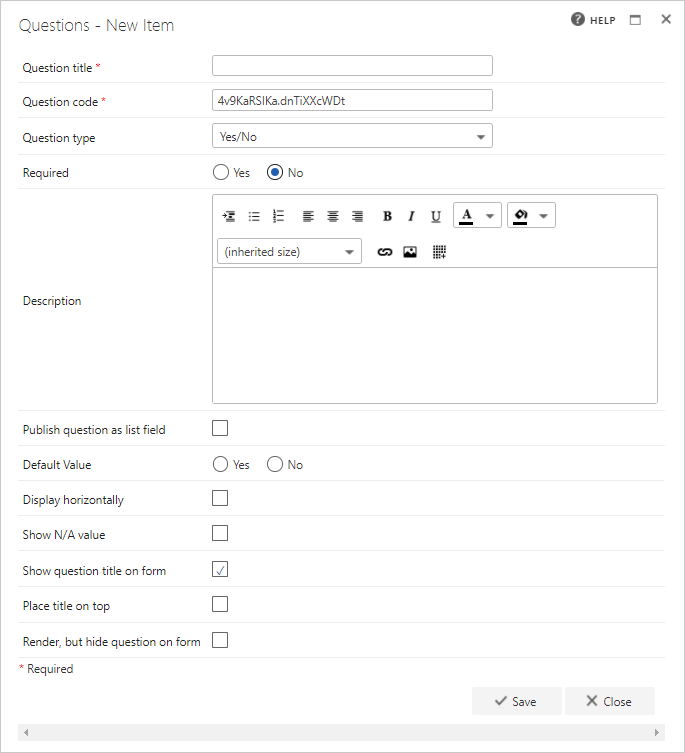
- Question title: each question must have a title. It’s a required field and appears on the form as a label when the user fills in the question
- Question code: each question needs a unique code. One is generated by default when you start creating a new question, but you can overwrite this and give it a different code if you prefer. The question code doesn’t appear on the form itself, but you can use it to search and filter questions when adding them
- Question type: yes/no
- Required: specify whether the question is required. If you set a question as required, the user must answer it before they can submit the form. However, the user can save as draft without answering all required questions. If they try to submit a form without answering all required questions, an error message appears showing a list of the unanswered questions
- Question description: entering a description is optional. The description is used as a tooltip on the form and adds an exclamation point beside the question. If the user clicks the exclamation point, the description (tooltip) appears
- Publish question as list field: check this box to save the question to the SharePoint forms list. This allows you to report on the question from there
- Default value: if you want one of the options (Yes or No) selected by default, select it here
- Display horizontally: if you want, you can display the radio button options horizontally rather than vertically on the form
- Show N/A value: if you need to include an “N/A” option, check this box to show it
- Show question title on form: check this option if you want to display the question’s title to the left of the input field. If you uncheck this option, the input field moves to the left and appears right under the other questions/question titles
- Place title on top: check this option to display the question’s title above the input field. If you uncheck this option, the title appears to the left of the input field, as normal
- Render, but hide question on form: if you check this option, the question behaves as normal (default value, publishing, and calculation still apply), but it isn’t displayed on the form