

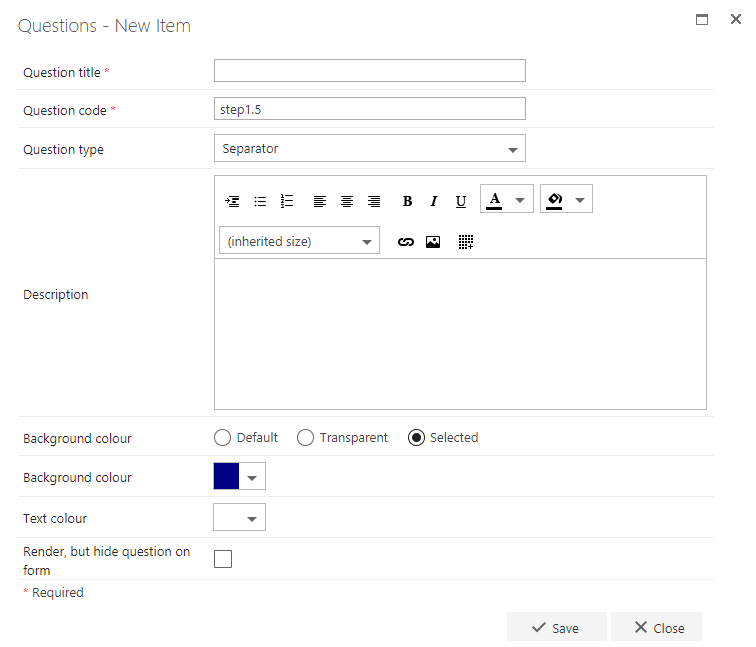
- Question title: each question must have a title. It’s a required field and appears on the form as a label when the user fills in the question
- Question code: each question needs a unique code. One is generated by default when you start creating a new question, but you can overwrite it and give it a different code if you prefer. The question code doesn’t appear on the form itself, but you can use it to search and filter questions when adding them
- Question type: separator
- Question description: entering a description is optional. If you enter a description, it’s used as the text displayed on the separator bar. If you leave it blank, the separator bar has no text. You can also add an image or link(s) that appear on the separator bar
- Background colour: use the radio buttons to select default, transparent, or selected. If you choose selected, you need to select the colour below
- Background colour: use the drop-down to select a background colour. You can also copy and paste the hexadecimal number of a colour here to ensure the same colour is selected each time
- Text colour: use the drop-down to select a text colour. You can also copy and paste the hexadecimal number of a colour here to ensure the same colour is selected each time
- Render, but hide question on form: if you check this option, the question behaves as normal (default value, publishing, and calculation apply), but it isn’t displayed on the form