

Questions
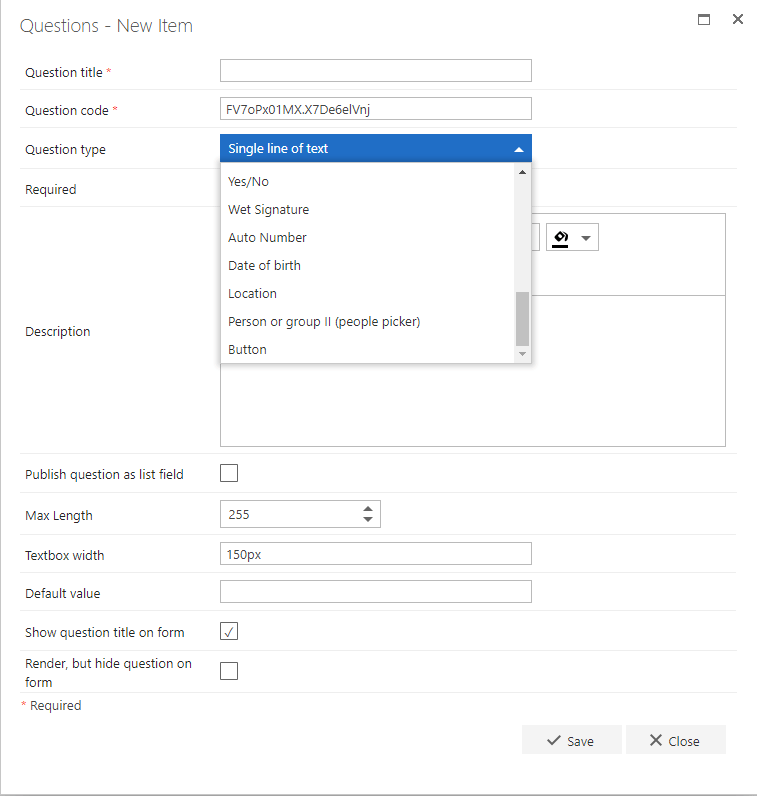
Click the Get button next to the question you require. It will be deployed and the button will change to Deployed. The question is then available in the questions drop-down in the Flow Designer and can be used when creating any process on your site.- Auto Number: this question generates an incremental number based on a SharePoint list item. This is often used to populate a PO number or a specific number where the form ID cannot be used.
- Button: you can add a question change rule to this question type, when the button is clicked the rule will be executed.
- Date of birth: this question type displays fields to enter a day, month and year.
- Location: this question returns the longitude and latitude coordinates. It can also return the altitude if that is set in the configuration. The browser will require access to your location in order for it to work.
- Person or group II: Updated version of the “Person or group” question, with the ability to select multiple values and retrieve users directly from the user profile service
Rules
Click the Get button next to the rule you require. It will be deployed and the button will change to Deployed. The rule is then available in the add rules section of the Flow Designer and can be used when creating any process on your site.- Text Modification - Capitalize: this rule allows you to capitalize the first letter of each word of the text entered in the question selected in the rule.
- Data integration - CSV Mapping: this rule allows you to map a CSV file to a repeating table.
- Calculations - Date calculation: this rule allows you to calculate the number of non-working days between two dates entered into two different date questions
- Calculations - Date difference: this rule allows you to calculate the total number of days between two dates entered into two different date questions.
- SharePoint Actions: Delete List Items: this rule allows you to delete items from a defined SharePoint list.
- Data Integration: Get user profile property (Graph): Retrieve properties from Azure AD via Graph for a given user - instructions for app registration
- Repeating Table - Identify unique RT Column: set on a sub-question (inside the repeating table), this allows you to check if the value entered or selected in a row is unique inside the table. For example, if you want to check that a selected code has not been selected twice inside the table, this is the rule to use.
- Communications - Multiple document generation: Generates multiple documents using repeating table rows
- Repeating Table - Trigger RT question update: this rule allows you to trigger rules set on a column of a repeating table. This rule needs to be located on a standard question (i.e. not inside a repeating table) or on step completing. When this rule triggers, it will execute all rules set on the specified column for each row of your repeating table inside your form.
Status for the add-on
- Get: the question/rule is not currently added to the site.
- Deployed: the question/rule is currently added to the site and using the latest version.
- Get new version: this means that the add-on has already been added to the site, but a new version is available.