

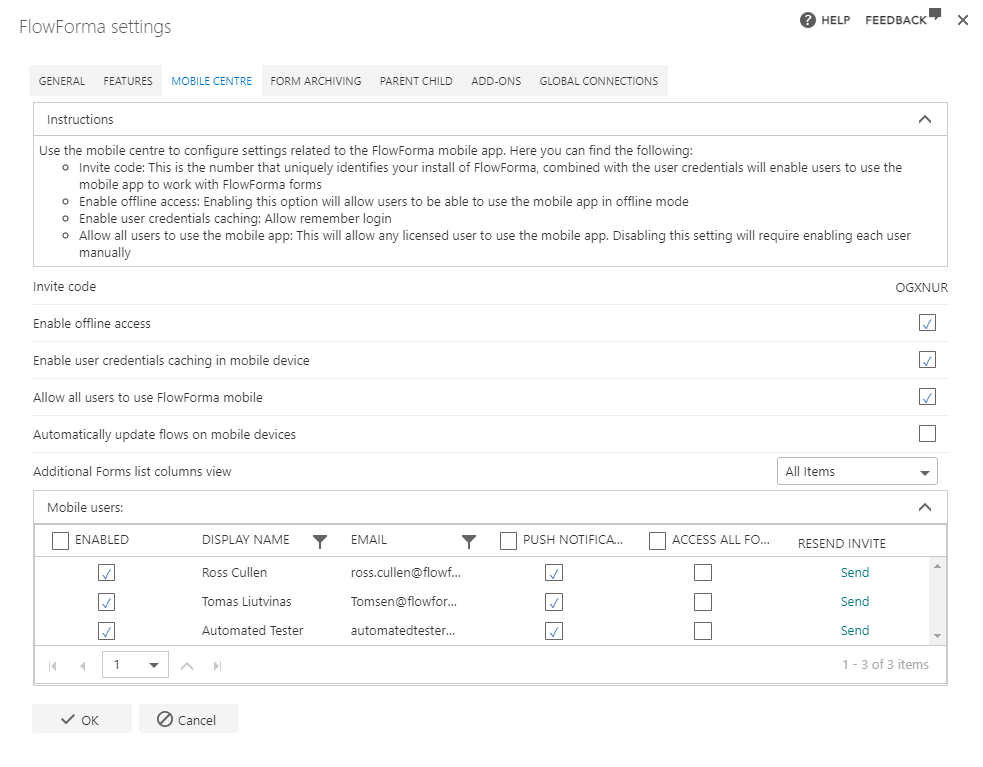
- Invite Code: this is the number that uniquely identifies your FlowForma installation, and combined with the user credentials, it allows users to use the mobile app to work with FlowForma forms
- Enable offline access: enabling this option will allow users to use the mobile app in offline mode
- Enable user credentials caching: remembers the user’s login details
- Allow all users to use the mobile app: this will allow any licensed user to use the mobile app. Disabling this setting will require enabling each user manually
- Automatically update flows on mobile devices: enables the ability to have the mobile app automatically download the latest version of the flow when users create a new form
- Additional Forms list columns view: enables the ability to display a different view with additional columns in the mobile app
- Enabled: checkbox to enable or disable a user’s access to the app
- Display name: displays the users display name
- Email: displays the email address associated with that user
- Push Notifications: enable or disable mobile notifications. This can be configured on a per user or all user basis
- Access all forms: enable or disable access to all forms. This can be configured on a per user or all user basis
- Resend invite: you can resend an email to the user. The email contains a message letting them know they’ve been invited to use the app, and the invite code needed to log in