

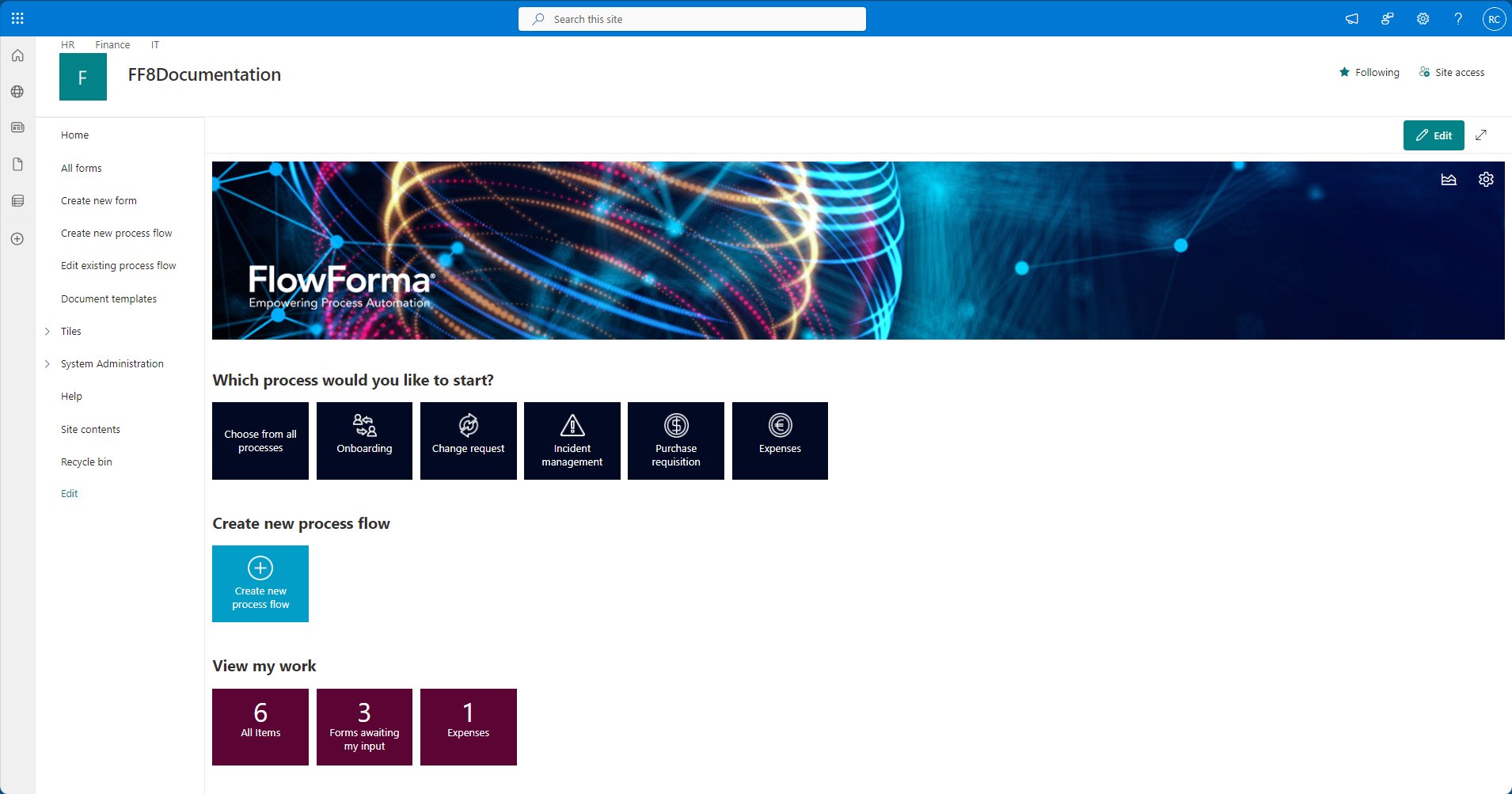
Navigation
Note: this section assumes the default navigation is still in place and no modifications have been made.
Home
Returns you to the main landing page.All forms
Provides an overview of all forms.Create new form
Used to launch new instances of forms.Create new process flow
Used to create new process flows.Edit existing process flow
Opens the flows list, allowing you to launch the Flow Designer for existing flows.Document templates
Central repository for templates that are used to generate documents.Tiles
Allows you to add, remove, or modify tiles displayed on the homepage.Expanding the Tiles group displays additional links allowing you to navigate to:
Process tiles
Opens the process tiles list.Process count tiles
Opens the process count tiles list.System Administration
Questions
Opens the questions list.Steps
Opens the steps list.Flows
Opens the flows list.Email Templates
Opens the email templates list.Email Scheduler
Opens the email scheduler list.Form Documents
Opens the form documents library.I Am On Leave
Opens the vacations list, where you can record your leave dates and set a substitute.Help
Opens this documentation site.Site contents
Displays an overview of all libraries, lists, and sub-sites within this site.Recycle bin
Stores deleted items and provides options for restoring or permanently removing them.Edit
Enables editing of the current navigation links.Homepage sections
Banner
Displays the default banner and logo.These can both be changed in FlowForma settings. On the top right are two buttons to:
- Open Process Performance
- Open FlowForma settings
Which process would you like to start?
Select any of the displayed tiles (e.g., Onboarding, Change Request, Incident Management) to initiate a specific workflow.Create new process flow
Click this tile to build a custom process flow using the FlowForma designer.View my work
- This section shows at-a-glance metrics, such as how many forms are awaiting your input, total items, or expenses to review.