

Connecting to your Dynamics CRM requires you to create a “registered app” in Azure AD, as Microsoft no longer supports “basic” authentication.
Title
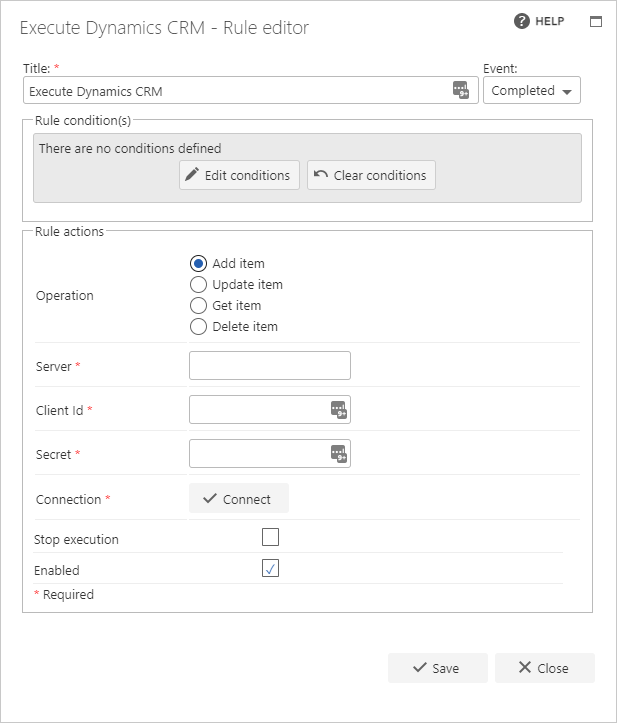
The first part of the business rule lets you define a title for your rule, and then select the event on which the rule should operate. The default title of the rule is the standard FlowForma rule name. You can change this by deleting the text and entering your own text. In the event field, you determine when the rule is executed. For a flow, this can occur when the form is loaded, started, or completed. For a step, this can occur when the step is started, saved, or completed. For questions, it can occur when the question is updated.Rule condition(s)
The second part of the business rule allows you to set conditions. These are not required, but if entered are used to control when the rule is executed in relation to other items contained in the form.Rule actions
- Operation: select the operation you want to configure
- Add item: adds a new item in the selected entity set.
- Update item: updates an existing item in the selected entity set.
- Get item: returns an existing item from the selected entity set.
- Delete item: deletes an item from the selected entity set.
- Server: enter the URL of the CRM server to use for the connection.
- Client Id: enter the client ID from the registered app created in Azure AD.
- Secret: enter the secret created in the registered app in Azure AD.
- Connection: once you’ve provided the server, client ID, and secret, click Connect to establish a connection to the CRM server.
- Entity sets: select the entity set.
- Entity id question: shown for the Update, Get, and Delete operations. Select a question (a CRM lookup) that identifies the item to act on by filtering on its entity id. When the rule executes, it updates, retrieves, or deletes the entity item with that entity id.
- Input mappings: shown for the Add item and Update item operations. Map form questions to the fields of the selected entity, to set the values written to CRM.
- Output mappings: shown for the Get item operation (the mapping table is titled “Output mappings”). Map the fields of the retrieved entity back to form questions, to bring the CRM values into the form.
- Output Mappings: shown for the Add item operation. This section returns the CRM entity id of the newly created record into a form question you select.