
E-signatures do not support accounts with MFA enabled.
-
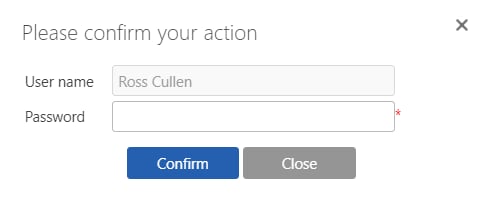
Standard signature: requires the user to enter only their password, as the username is automatically populated with the currently logged-in user’s details.
-
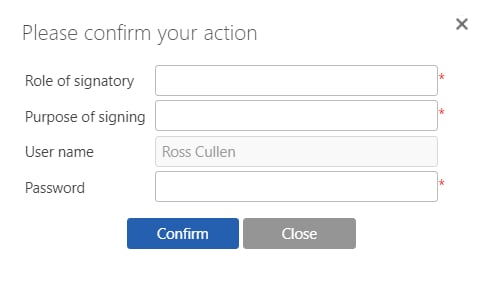
21 CFR signature: when the assigned user clicks submit, the system requests the following information:
- Role of signatory: the user’s responsibility to review, approve, and authenticate the content being signed, ensuring its accuracy and compliance with regulatory requirements.
- Purpose of signing: the reason or intent behind the signature, such as approval, verification, or acknowledgment of the document or process.
- User name: automatically populated with the name of the currently logged-in user, identifying the individual responsible for the signature.
- Password: the current user’s account password, required to authenticate their identity and confirm the signature.
Settings
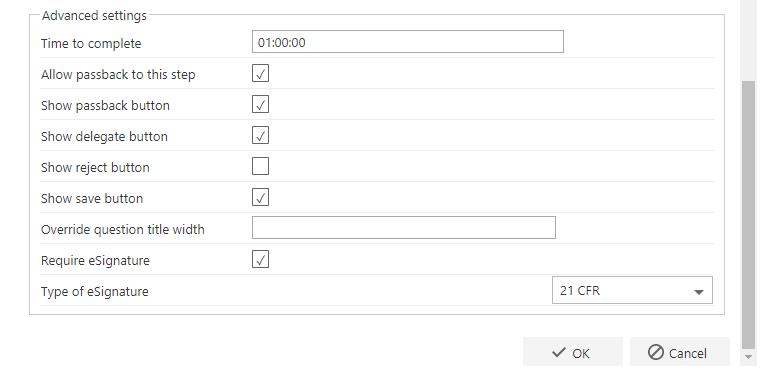
To set up an e-signature, enable Require eSignature in the step settings, then use Type of eSignature to select the required type of signature. If you want to enforce a user to sign in when casting a vote, make sure that e-Signature required is set to yes in the voting question settings.