

Title
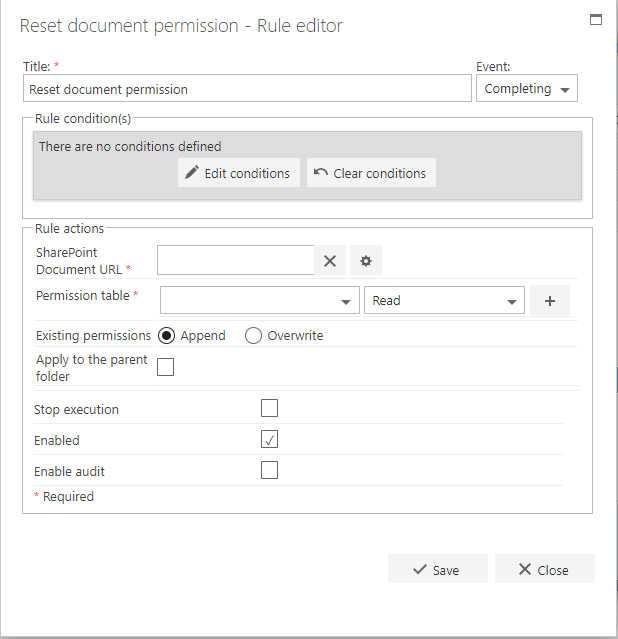
The first part of the business rule lets you define a title for your rule and select the event on which it operates. The default title is the standard FlowForma rule name; change it by deleting the text and entering your own. In the event field you determine when the rule is executed. For a flow this can occur when the form is loaded, started, or completed. For a step this can occur when the step is started, saved, or completed. For questions it can occur when the question is updated.Rule condition(s)
The second part of the business rule lets you set conditions. These are not required, but if entered they control when the rule is executed in relation to other items in the form.Rule actions
- SharePoint Document URL: click the editor icon to open the document picker. Navigate to the relevant question; only questions with documents/files can be selected. Click OK. The question now appears as read-only in the entry box, and you can remove it by clicking X.
- Permission table: once you’ve selected the document URL, you need to apply permissions. To do this, first select a person or group question from the drop-down list. This determines who the rule applies to. Then use the drop-down menu beside it to select Read, Contribute, or Full Control to set the type of permission. You can add additional permissions by clicking + and repeating the process.
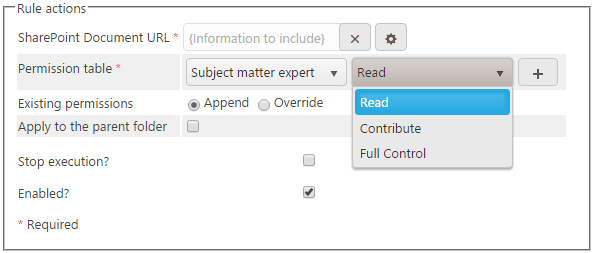
- Existing permissions: if you select Append, the new permissions set above are added to the existing permissions. If you select Overwrite, only the new permissions specified above will apply.
- Apply to the parent folder: check this option if you want to apply the new permissions to the parent folder.
This rule is not compatible with Multiple File Upload questions.
- Stop execution: if stop execution is enabled and this rule is executed, no other rules are executed.
- Enabled: rules aren’t saved to a list like questions and steps are, so if you want to stop a rule executing without deleting it, toggle this option to enable or disable the rule.
- Enable audit: if checked, a record is added to the audit trail when this rule is executed. This option is available when the Compliance feature pack is activated.