

Title
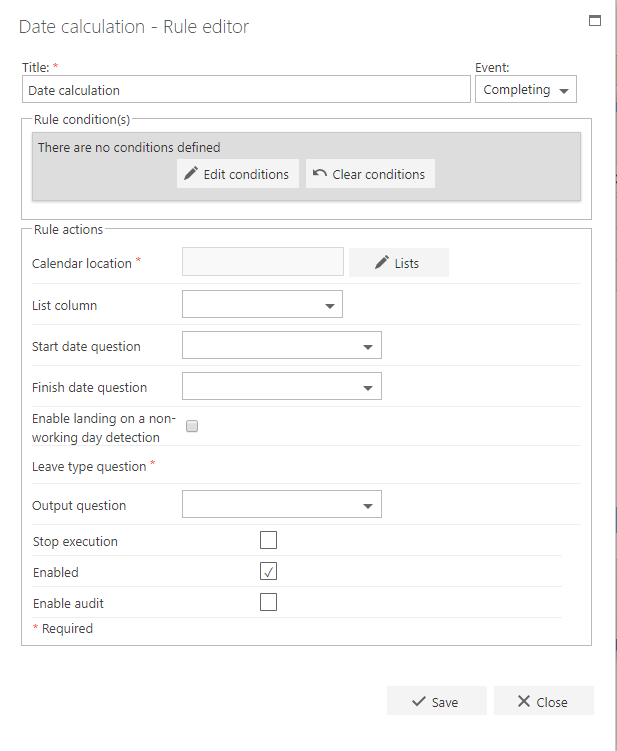
The first part of the business rule lets you define a title for your rule and select the event on which it operates. The default title is the standard FlowForma rule name; change it by deleting the text and entering your own. In the event field you determine when the rule is executed. For a flow this can occur when the form is loaded, started, or completed. For a step this can occur when the step is started, saved, or completed. For questions it can occur when the question is updated.Rule condition(s)
The second part of the business rule lets you set conditions. These are not required, but if entered they control when the rule is executed in relation to other items in the form.Rule actions
- Calendar location: select the SharePoint list which contains the bank holidays. This list doesn’t need the weekends listed inside, as the rule will automatically include them.
- List column: select the column in your list which contains the dates. This needs to be a date column type.
- Start date question: select the date question from your flow, as this will be the starting point for the count.
- Finish date question: select the date question from your flow which will be the finishing point for the count.
- Enable landing on a non-working day detection: this option adds extra days to the result to avoid landing on a non-working day. Use this to create a working day deadline. For example, if you want to add 10 working days to a date, you count how many non-working days there are between the current date and the +10 calendar date, then add them to the second date. Checking this option ensures that the final date doesn’t fall on a Saturday or a Sunday.
- Output question: this is where the number of non-working days is returned. It needs to be a number question type.
- Stop execution: if stop execution is enabled and this rule is executed, no other rules are executed.
- Enabled: rules aren’t saved to a list like questions and steps are, so if you want to stop a rule executing without deleting it, toggle this option to enable or disable the rule.
- Enable audit: if checked, a record is added to the audit trail when this rule is executed. This option is available when the Compliance feature pack is activated.