

- Navigate to the questions list
- Modify the view to show questions IDs
- Once you have the ID number of the question you want to hide you need to navigate to the FlowFormaAssets and open the CSS folder.
- Download a copy of the custom.css file, and open it in a text editor.
- The code to hide questions is
- In this example, we are going to hide the status question (id 5)
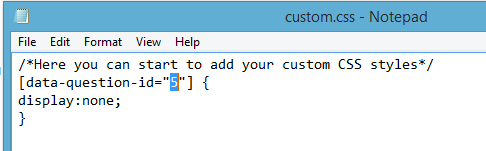
- Save the changes and upload the custom.css file in the css folder; you can do this by simply dragging and dropping the file.
- You will be notified that a file with the same name exists, but you can click “replace it”.
- The question should now be hidden from on the form, but the functionality of a visible question remains.