

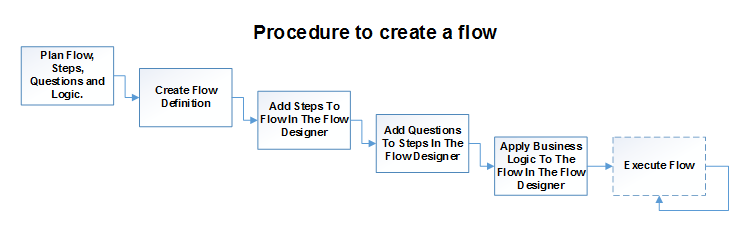
- What are the steps, and in which order do they need to occur? For example: “Employee Request” → “Manager Approval” → “HR Approval” → “CEO Approval”. Steps execute in sequence by default, but you can execute some in parallel so they can be actioned in any order. A flow can combine both sequential and parallel steps: for instance, the employee submits their request, it enters a parallel group where the manager and HR can approve in any order, and finally it may go to the CEO for approval if required.
- What type of data do you need to capture in each step? The data you capture becomes the questions you add to each step. An employee request might contain “employee name”, “employee manager”, “leave start date”, “leave end date”, and “type of leave”; approval steps might capture “approved by”, “approval date”, and “approval answer”. There are over 25 question types, including single line of text, multiple lines of text, number, date, lookups, and many more.
- Do you need to apply business logic? Business logic is rules and actions you apply to your flow, so that when something happens, an action is performed, such as sending emails to notify managers when a new leave request is submitted. There are over 30 business rules, including hide/show questions, hide/show steps, document generation, send email, get list data, add/update list data, and data validation. You can also apply conditional statements so a rule only runs when the condition is true. For example: if the manager’s approval is yes, send the “manager approval” email; if no, send the “manager rejection” email. Another example is using the data validation rule to enforce that an employee cannot make a leave request without a week’s notice: the leave start date must not be less than today + 7 days.
Going live
Once you have your flow built, there are a few things to consider before going live:- Should the flow be available to all users or only certain users, and does it contain sensitive data? If so, you can use the Security Wizard.
- Do you want to use the Mobile app?
- Do you have reporting requirements? You can export your FlowForma data to Excel, or report on it with Power BI.