

Function

FlowForma.Widgets.PersonOrGroupPicker(container, value, options)

Description

This function creates a FlowForma picker, when using a person or group picker.

Uses

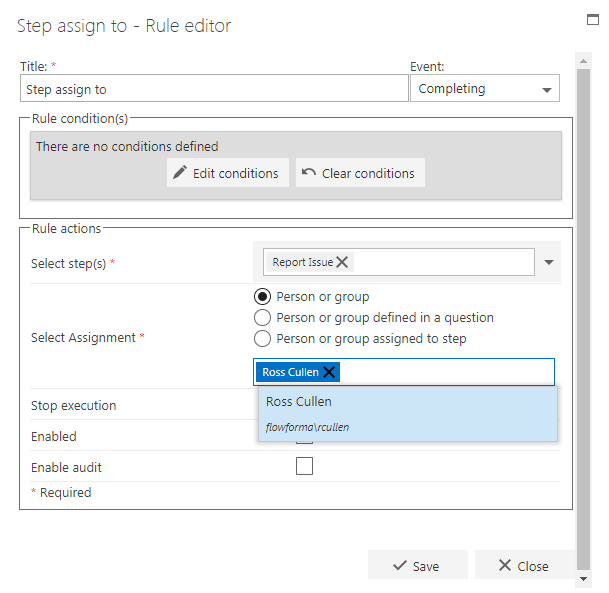
An example of when this is used is when a person or group question has been added to the flow, and a user is entering in a name. Also when configuring the Step assign to rule, the person configuring the rule may need to enter a name of a person or group. PersonOrGroupPicker widget
Variables

container: Format - jQuery input element. (Example: $(“#picker”)). Description - This element will be used to build the FlowForma people picker on to. value: Format – Stringified JSON object. Description – If the variable is defined it selects the user. options: Format – Object. (Example: var options = { AllowCustomText: true, SelectSteps: true }). Default options
AllowCustomText = false;
SPGroupID: '',
SelectionMode: 'PeopleGroups',
InputEnabled: true,
Height: '30px',
Width: "300px",
Scrolling: "no",
Restrict2Self: false,
AllowMultiple: false
Description – Allows to set custom functionality to the widget.

Properties and functions

FlowForma picker object has few functions and properties and can be retrieved as shown below:
var picker = $("#picker").data("PersonOrGroupPicker");
Functions: Picker.Value() – returns currently selected person object as JSON string. Picker.Enable(bool) – enables/disables the picker by passing true or false. Picker.Clear() – clears the currently selected value.picker. Picker.OnEntityResolved() - this is useful to see when it was resolved and the whole object of the person/group was returned