

Function

FlowForma.Widgets.FlowEntityPicker(container, value, options)

Description

This function creates FlowForma picker, that will let you select steps and questions from a drop-down box.

Uses

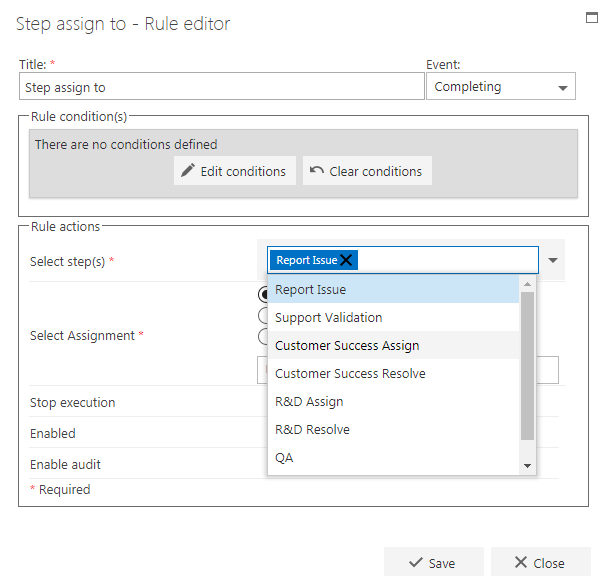
An example of where this would be used is in the Step assign to rule, you will need to “select a step”. FlowEntityPicker drop-down
Variables

container: Format - jQuery input element. (Example: $(“#destQuestion”)). Description - This element will be used to build the FlowForma picker on to. value: Format – Stringified JSON object. (Example: '{"StepCode":"step1","QuestionCode":"step1.1","Type":"question","SubQuestionCode":null,"StepId":1,"QuestionId":1}') Description – If the variable is defined it selects the defined question otherwise nothing is selected. options: Format – Object. (Example: var options = { AllowCustomText: true, SelectSteps: true }). Default options – AllowCustomText = false;
AllowCustomText = false;
SelectSteps = false;
QuestionTypes = [];
DisplayFormProperties = false;
Flow = FlowForma.FlowContext.Flow;
Width = '200px';
DisplayLookupFields = false;
DisableSubQuestionsInRepSubQuestions = false;
OnlyPublishedQuestions = false;
DisplaySubquestions = false;
EnableValueClear = false;
Description – Allows to set custom functionality to the widget.

Properties and functions

FlowForma picker object has few functions and properties and can be retrieved as shown below:
var picker = $("#destQuestion").data("FlowEntityPicker");
Functions: Picker.Value() – returns currently selected node object as JSON string. Picker.Enable(bool) – enables/disables the picker by passing true or false. Picker.Clear() – clears the currently selected value.picker. Properties: Picker.Data – return array of objects that were built in the picker.