> ## Documentation Index
> Fetch the complete documentation index at: https://docs.flowforma.com/llms.txt
> Use this file to discover all available pages before exploring further.
# Teams
> Set individual capacity for users in a SharePoint team so FlowForma reassign work item rules distribute forms to the member with the most availability.
Teams allow you to set the capacity for individual users within a SharePoint team.
Capacity allows you to set the number of work items a user can be assigned to.
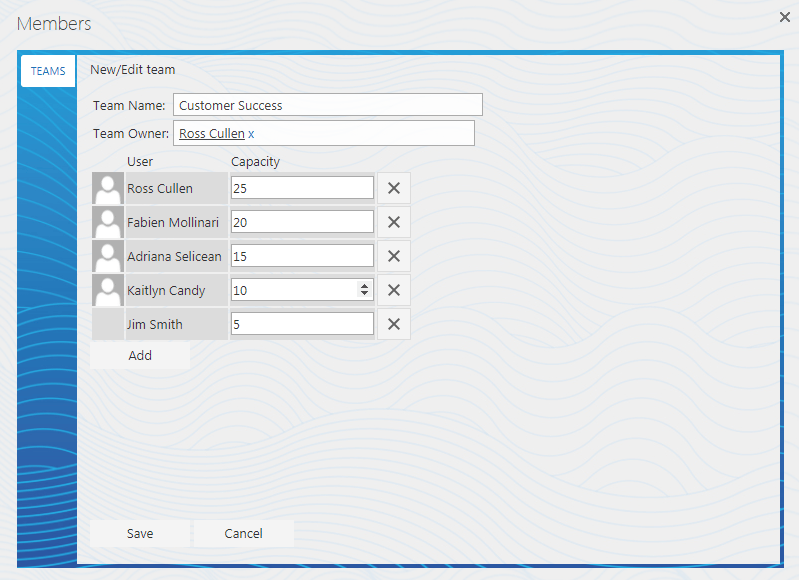 For instance, in the image above, when a work item is reassigned, FlowForma checks the team members and sees that Ross Cullen has the highest capacity, so it reassigns the item to him. It continues assigning work items to Ross Cullen until his capacity reaches 20, then it alternates between Ross Cullen and Fabien Mollinari until their capacity reaches 15, then it alternates between Ross, Fabien, and Adriana. This continues until it includes Kaitlyn, and then Jim.
When a user assigned to a work item completes it, their capacity increases again.
A form is only considered a work item when the **[Reassign work item](/product/creating-flows/business-rules/business-rule-types/feature-pack-business-rules/reassign-work-item)** rule executes to reassign it. Only the rule executing affects the capacity; regular delegation does not affect the user's capacity.
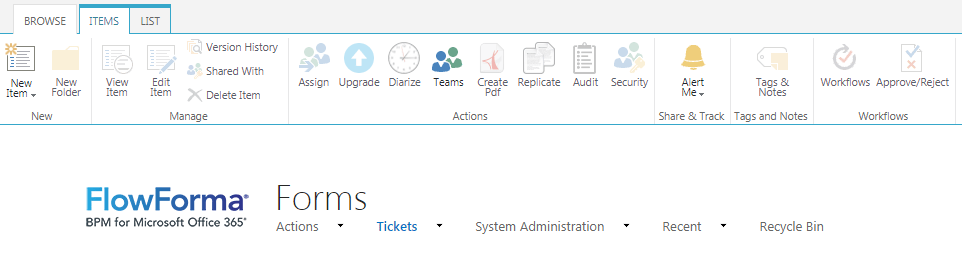
To set up Teams, navigate to the forms list, select the **Items** tab, and click the **Teams** icon in the ribbon.
For instance, in the image above, when a work item is reassigned, FlowForma checks the team members and sees that Ross Cullen has the highest capacity, so it reassigns the item to him. It continues assigning work items to Ross Cullen until his capacity reaches 20, then it alternates between Ross Cullen and Fabien Mollinari until their capacity reaches 15, then it alternates between Ross, Fabien, and Adriana. This continues until it includes Kaitlyn, and then Jim.
When a user assigned to a work item completes it, their capacity increases again.
A form is only considered a work item when the **[Reassign work item](/product/creating-flows/business-rules/business-rule-types/feature-pack-business-rules/reassign-work-item)** rule executes to reassign it. Only the rule executing affects the capacity; regular delegation does not affect the user's capacity.
To set up Teams, navigate to the forms list, select the **Items** tab, and click the **Teams** icon in the ribbon.