> ## Documentation Index
> Fetch the complete documentation index at: https://docs.flowforma.com/llms.txt
> Use this file to discover all available pages before exploring further.
# Bulk assign forms
> Bulk assign multiple FlowForma forms to a user from the All forms list, add a message, and notify the assignee by email in a single administrator action.
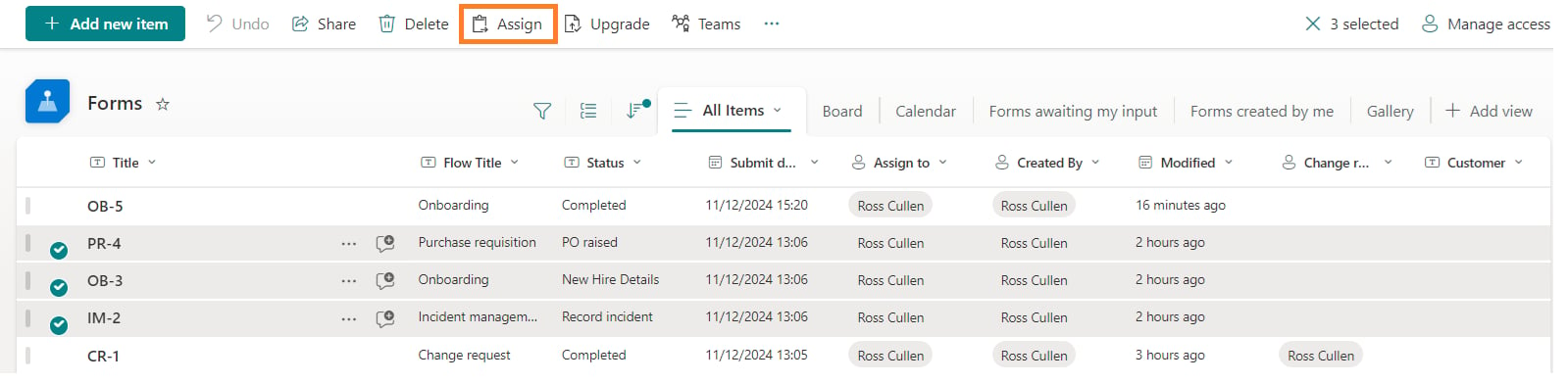
If you want to assign multiple forms to a user you can do so from the forms list. Select **All forms** on the left navigation pane, then filter to the particular set of forms you want to assign, and click **Assign** from the ribbon.
 A bulk assign dialog appears.
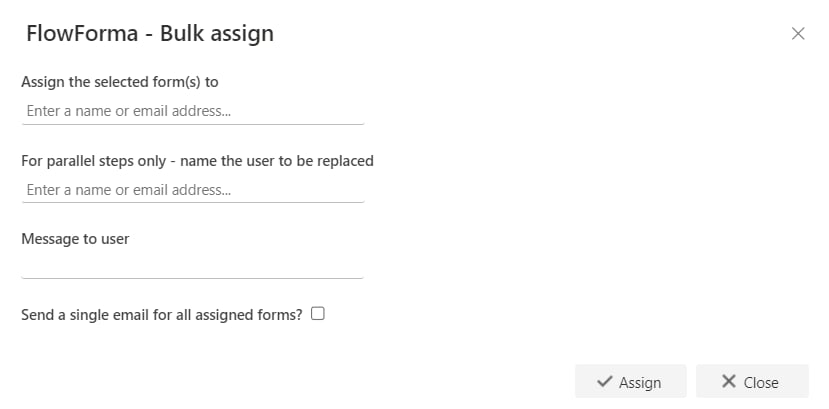 * **Assign the selected form(s) to**: select the user you want to assign the selected form(s) to.
* **For parallel steps only - name the user to be replaced**: select the name of the user you want to replace with the user specified above.
* **Message to user**: enter a message here to become the body of a message sent to the assignee.
* **Send a single email for all assigned forms?**: send only one email to the assignee, listing all the forms.
* Click **Assign**. The selected items are then reassigned to the selected user.
The user the form(s) have been assigned to then receives an email notification detailing who reassigned the forms and the IDs of the forms that were reassigned.
Note: the bulk assign option is only available for FlowForma Administrators.
* **Assign the selected form(s) to**: select the user you want to assign the selected form(s) to.
* **For parallel steps only - name the user to be replaced**: select the name of the user you want to replace with the user specified above.
* **Message to user**: enter a message here to become the body of a message sent to the assignee.
* **Send a single email for all assigned forms?**: send only one email to the assignee, listing all the forms.
* Click **Assign**. The selected items are then reassigned to the selected user.
The user the form(s) have been assigned to then receives an email notification detailing who reassigned the forms and the IDs of the forms that were reassigned.
Note: the bulk assign option is only available for FlowForma Administrators.