> ## Documentation Index
> Fetch the complete documentation index at: https://docs.flowforma.com/llms.txt
> Use this file to discover all available pages before exploring further.
# The FlowForma site
> Get to know the FlowForma SharePoint site layout, from navigation links and system administration lists to the homepage tiles for starting and tracking forms.
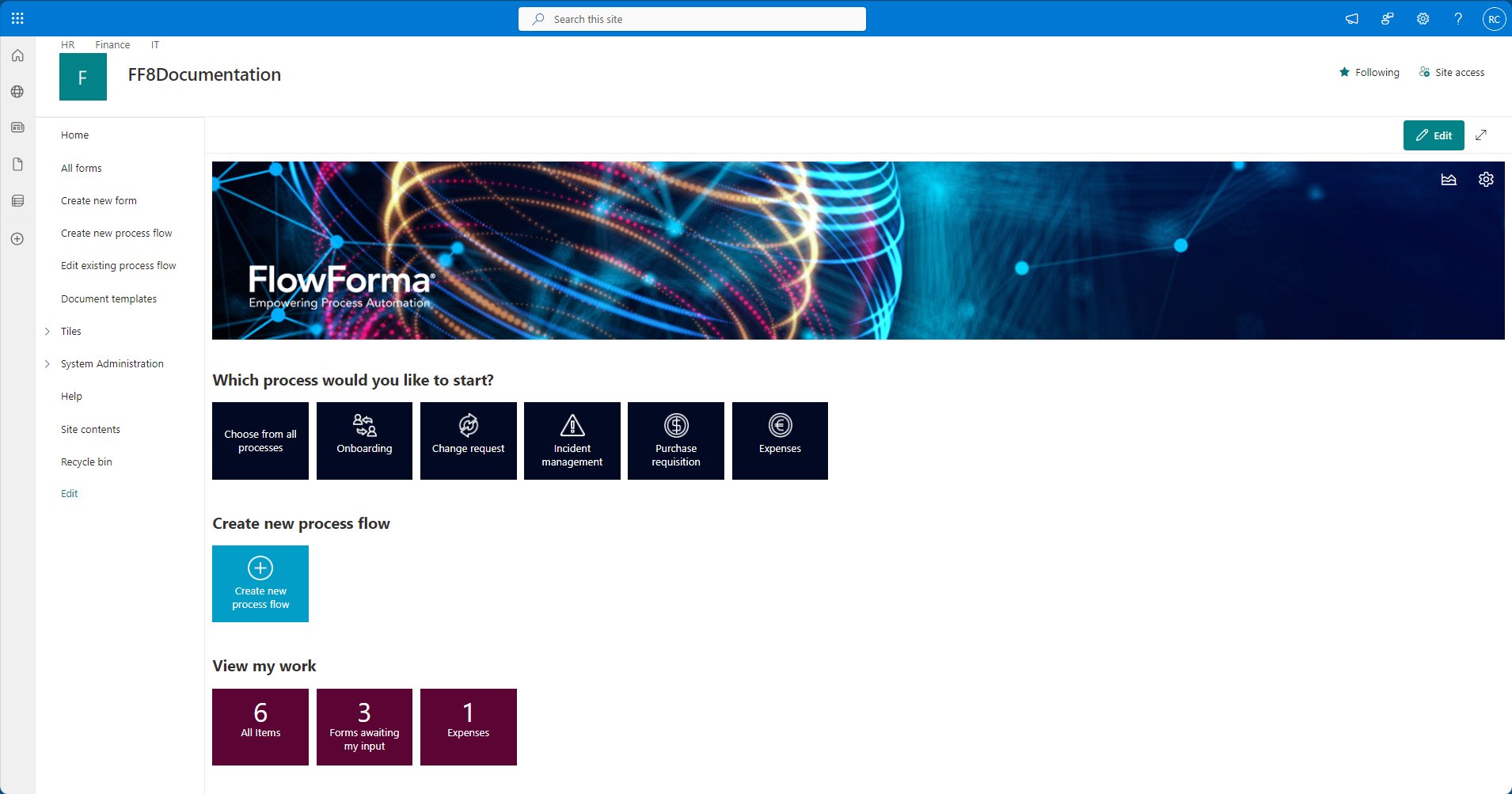 ## Navigation
**Note**: this section assumes the default navigation is still in place and no modifications have been made.
### Home
Returns you to the main landing page.
### All forms
Provides an overview of all forms.
### Create new form
Used to launch new instances of forms.
**Create new process flow**
Used to create new process flows.
**Edit existing process flow**
Opens the flows list, allowing you to launch the Flow Designer for existing flows.
### Document templates
Central repository for templates that are used to generate documents.
### Tiles
Allows you to add, remove, or modify tiles displayed on the homepage.\
Expanding the Tiles group displays additional links allowing you to navigate to:
#### Process tiles
Opens the process tiles list.
#### Process count tiles
Opens the process count tiles list.
### System Administration
#### Questions
Opens the questions list.
#### Steps
Opens the steps list.
#### Flows
Opens the flows list.
#### Email Templates
Opens the email templates list.
#### Email Scheduler
Opens the email scheduler list.
#### Form Documents
Opens the form documents library.
#### I Am On Leave
Opens the vacations list, where you can record your leave dates and set a substitute.
### Help
Opens this documentation site.
### Site contents
Displays an overview of all libraries, lists, and sub-sites within this site.
### Recycle bin
Stores deleted items and provides options for restoring or permanently removing them.
### Edit
Enables editing of the current navigation links.
## Homepage sections
### Banner
Displays the default banner and logo.\
These can both be changed in [FlowForma settings](/product/flowforma-settings/overview).
On the top right are two buttons to:
* Open [Process Performance](/product/process-performance/overview)
* Open FlowForma settings
### Which process would you like to start?
Select any of the displayed tiles (e.g., Onboarding, Change Request, Incident Management) to initiate a specific workflow.
### Create new process flow
Click this tile to build a custom process flow using the FlowForma designer.
### View my work
* This section shows at-a-glance metrics, such as how many forms are awaiting your input, total items, or expenses to review.
## Navigation
**Note**: this section assumes the default navigation is still in place and no modifications have been made.
### Home
Returns you to the main landing page.
### All forms
Provides an overview of all forms.
### Create new form
Used to launch new instances of forms.
**Create new process flow**
Used to create new process flows.
**Edit existing process flow**
Opens the flows list, allowing you to launch the Flow Designer for existing flows.
### Document templates
Central repository for templates that are used to generate documents.
### Tiles
Allows you to add, remove, or modify tiles displayed on the homepage.\
Expanding the Tiles group displays additional links allowing you to navigate to:
#### Process tiles
Opens the process tiles list.
#### Process count tiles
Opens the process count tiles list.
### System Administration
#### Questions
Opens the questions list.
#### Steps
Opens the steps list.
#### Flows
Opens the flows list.
#### Email Templates
Opens the email templates list.
#### Email Scheduler
Opens the email scheduler list.
#### Form Documents
Opens the form documents library.
#### I Am On Leave
Opens the vacations list, where you can record your leave dates and set a substitute.
### Help
Opens this documentation site.
### Site contents
Displays an overview of all libraries, lists, and sub-sites within this site.
### Recycle bin
Stores deleted items and provides options for restoring or permanently removing them.
### Edit
Enables editing of the current navigation links.
## Homepage sections
### Banner
Displays the default banner and logo.\
These can both be changed in [FlowForma settings](/product/flowforma-settings/overview).
On the top right are two buttons to:
* Open [Process Performance](/product/process-performance/overview)
* Open FlowForma settings
### Which process would you like to start?
Select any of the displayed tiles (e.g., Onboarding, Change Request, Incident Management) to initiate a specific workflow.
### Create new process flow
Click this tile to build a custom process flow using the FlowForma designer.
### View my work
* This section shows at-a-glance metrics, such as how many forms are awaiting your input, total items, or expenses to review.