> ## Documentation Index
> Fetch the complete documentation index at: https://docs.flowforma.com/llms.txt
> Use this file to discover all available pages before exploring further.

# Installing

> Install the FlowForma Teams app from the Microsoft Teams app store, then pin it to the left navigation so you can launch and view forms without a browser.

You can install the FlowForma Teams app from the app store within Microsoft Teams.

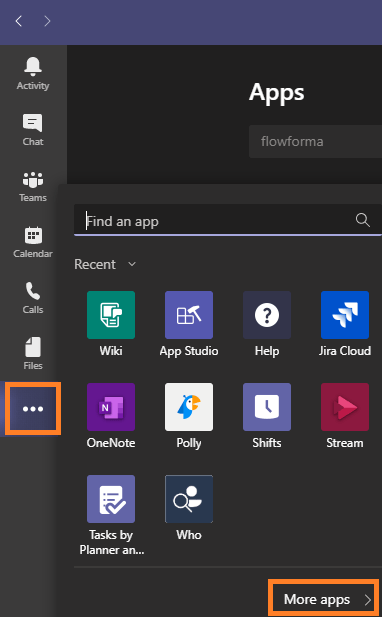
1. Click the three dots on the left-hand side navigation.
2. Click **More apps** in the bottom right.
   <img src="https://mintcdn.com/flowforma/YrATCKK3xaSeHj7W/images/product/teams-app/installing/installing-1.png?fit=max&auto=format&n=YrATCKK3xaSeHj7W&q=85&s=b9aae652a229bfbdaab6cb72c0247cfa" alt="Teams left navigation More Apps option" width="382" height="617" data-path="images/product/teams-app/installing/installing-1.png" />
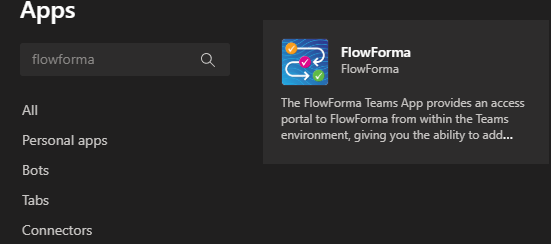
3. On the apps homepage, search for **FlowForma**.
   <img src="https://mintcdn.com/flowforma/YrATCKK3xaSeHj7W/images/product/teams-app/installing/installing-2.png?fit=max&auto=format&n=YrATCKK3xaSeHj7W&q=85&s=841cdd40d27080a3e22e7707747d1c57" alt="Searching for FlowForma in the Teams App Store" width="551" height="244" data-path="images/product/teams-app/installing/installing-2.png" />
4. Click the FlowForma tile.
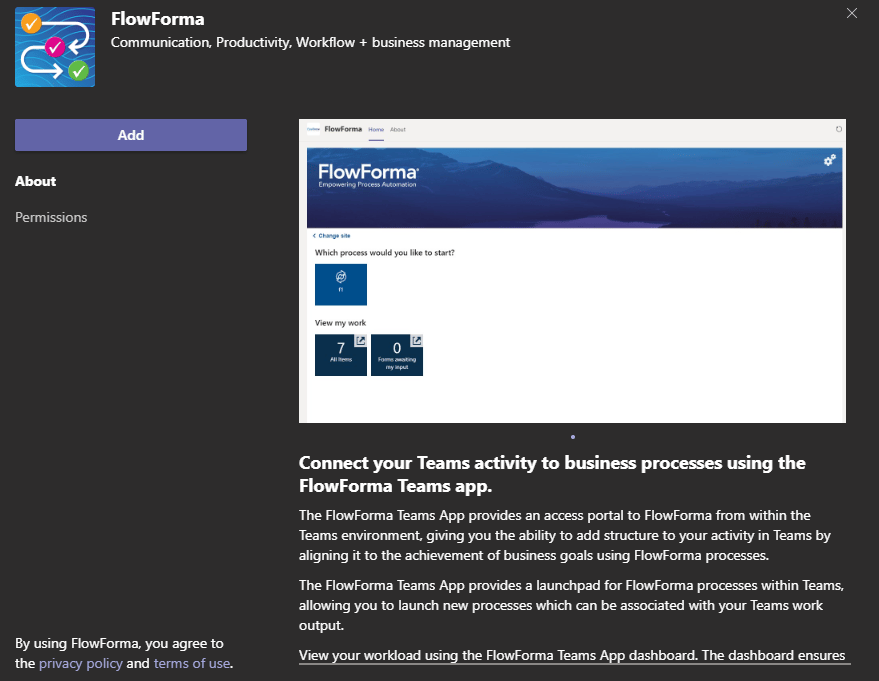
5. Click **Add**.
   <img src="https://mintcdn.com/flowforma/YrATCKK3xaSeHj7W/images/product/teams-app/installing/installing-3.png?fit=max&auto=format&n=YrATCKK3xaSeHj7W&q=85&s=af22b8641fa7df5fa45720b5cc06b30b" alt="FlowForma app page with Add option" width="879" height="681" data-path="images/product/teams-app/installing/installing-3.png" />
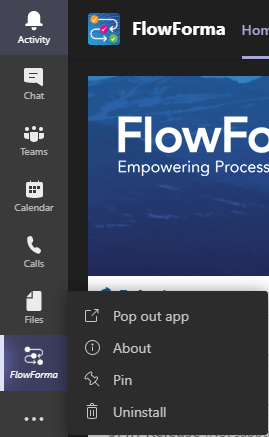
6. After the app is installed, you will see the FlowForma icon on the left-hand side menu.
7. Right-click the icon to pin it so it's always visible.
<img src="https://mintcdn.com/flowforma/YrATCKK3xaSeHj7W/images/product/teams-app/installing/installing-4.png?fit=max&auto=format&n=YrATCKK3xaSeHj7W&q=85&s=48b295ddc8a7c24dc0ebad1940345877" alt="FlowForma icon pinned on the Teams left hand side menu" width="269" height="437" data-path="images/product/teams-app/installing/installing-4.png" />
