> ## Documentation Index
> Fetch the complete documentation index at: https://docs.flowforma.com/llms.txt
> Use this file to discover all available pages before exploring further.
# Audit
> The Audit feature records a compliant history of form, step, question, and rule events, configurable at site, flow, or business rule level for review.
The Audit feature keeps a history of all relevant events within a form, serving both the users involved in the process and independent compliance auditors.
## Enabling the audit feature
**Event recording** can be enabled at different levels, depending on what you need to be audited, including: FlowForma Settings, Flow Level Settings, and Business Rules.
### FlowForma settings
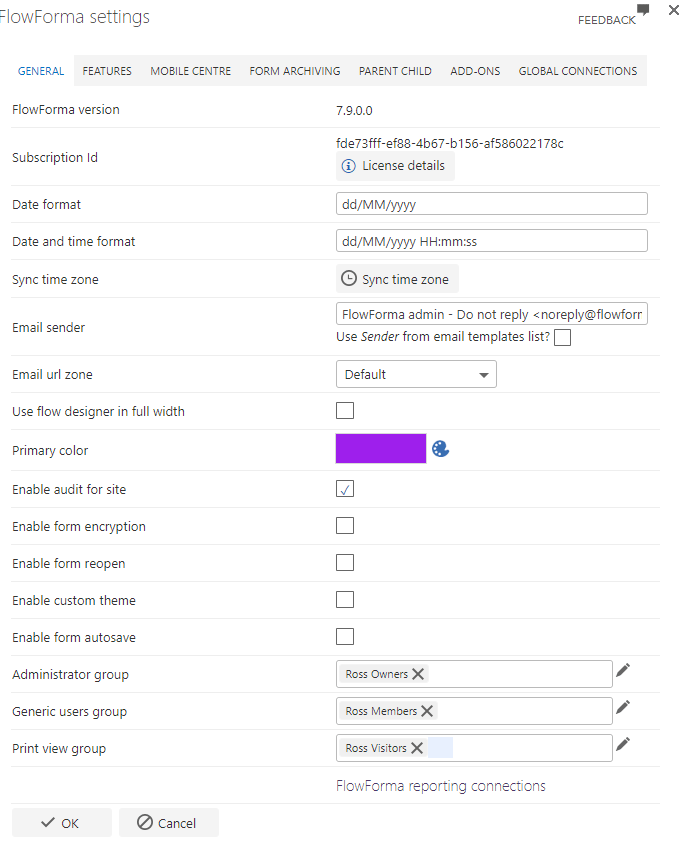
If enabled using [FlowForma settings](/product/flowforma-settings/overview), **all newly created forms for all flows will be audited**.
 ### Flow level settings
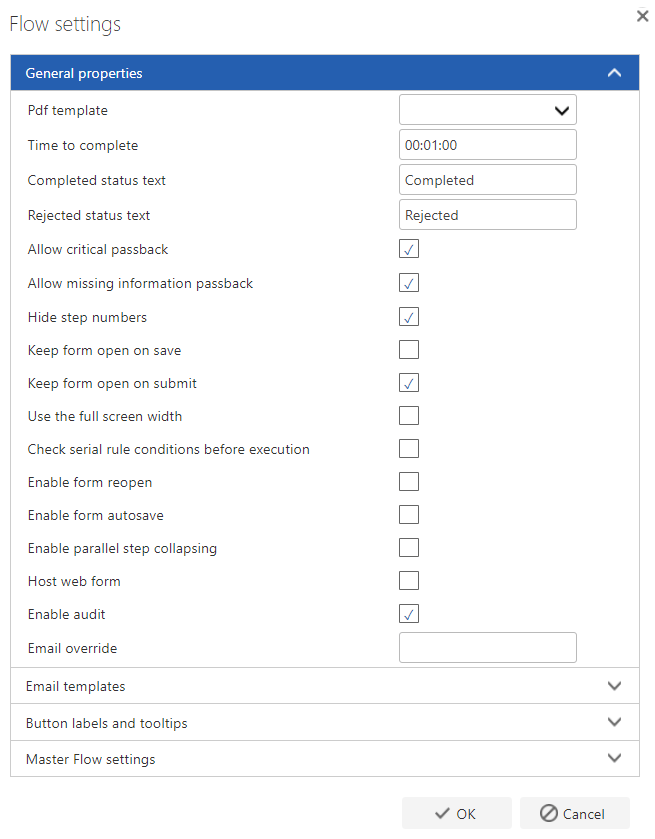
If enabled using Flow Settings in the Flow Designer, **all events for each form based on that flow will be audited**. This also only applies to new forms.
### Flow level settings
If enabled using Flow Settings in the Flow Designer, **all events for each form based on that flow will be audited**. This also only applies to new forms.
 ### Business rules
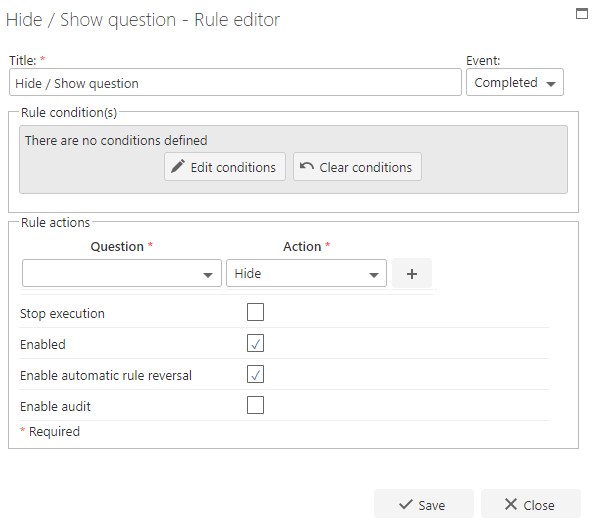
Auditing can be enabled on selected business rules; an option appears within the business rule editor. **Only events including the execution of business rules with auditing enabled will be logged.**
### Business rules
Auditing can be enabled on selected business rules; an option appears within the business rule editor. **Only events including the execution of business rules with auditing enabled will be logged.**
 ## Viewing the audit log
To produce an audit report, navigate to All Forms and select the **ITEMS** tab on the ribbon. You'll see the Audit option in the actions group.
## Viewing the audit log
To produce an audit report, navigate to All Forms and select the **ITEMS** tab on the ribbon. You'll see the Audit option in the actions group.
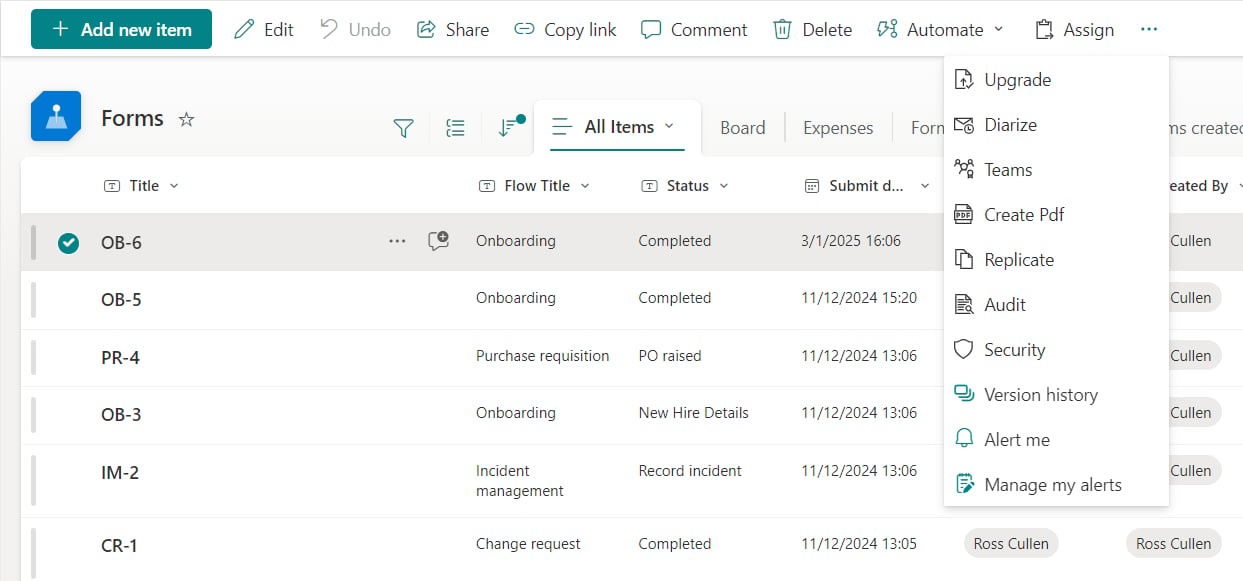 A dialogue loads, displaying the logged details.
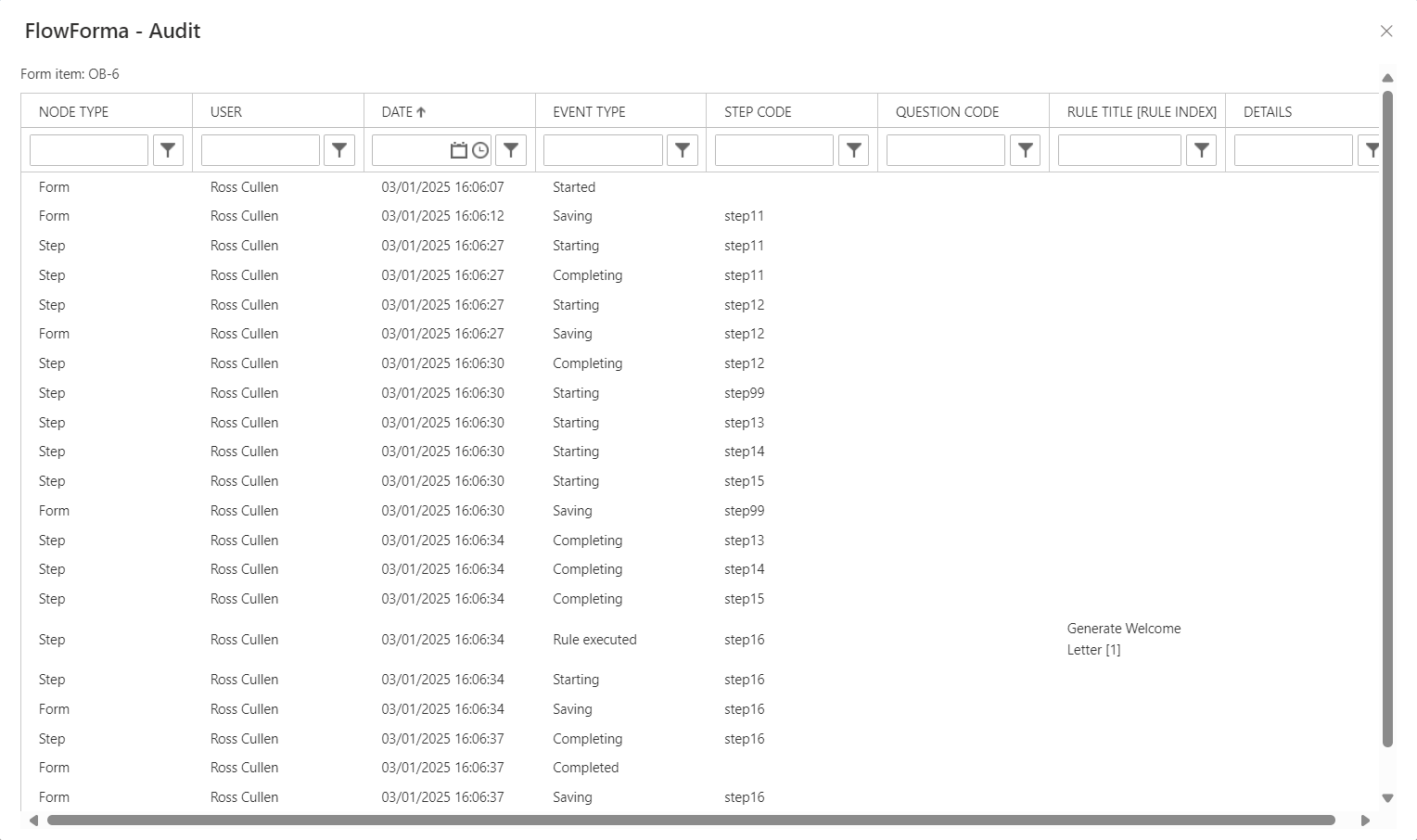 The following events are recorded by the system:
| | |
| --------------------- | --------------------------------------------------------------------------------------------------------------------------------------------------------------- |
| Node Type | Form, Step, Question or Subquestion |
| User | Username of the logged in user who caused the event to occur |
| Date | Date and time the event occurred |
| Event Type | Form started, Step Starting, Step Saving, Step Completing, Form Saving, Form Completing, Delegate, Pass back, Business Rule Execution, Voted, Signature checked |
| Step Code | Shows the Step Code if Node Type was a step |
| Question Code | Shows the Question Code if Node Type was a question/SubQuestion |
| Rule | Name of the rule and index number of the rule if there is more than one rule with the same name in the step. |
| Details (e-signature) | Capture role of signatory and purpose of signing |
FlowForma Event types:
| | |
| -------------------------------- | ------------------------------------------------------------------------------------------------------------------------------ |
| Flow Started | When a form list item is created based on that flow |
| Flow Completed | When a form reaches a completed status |
| Step Started | When a step becomes active |
| Step Completed | When a step is successfully submitted |
| e-Signature Recorded | When an e-Signature is successfully recorded |
| Save as Draft executed\* | When the assigned user presses the Save as Draft button in a step |
| Delegate executed\* from button | When the assigned user, the flow administrator or a FlowForma admin successfully delegates a step using the Delegate button |
| Pass Back executed\* from button | When the assigned user, the flow administrator or a FlowForma admin successfully passes back a step using the Pass Back button |
| Business rule executed\* | When any business rule action executes (i.e. rule conditions are true) |
| Voted event type | When the user cast their vote |
| Form saving event | When the assigned user presses the Save as Draft button in a step |
The following events are recorded by the system:
| | |
| --------------------- | --------------------------------------------------------------------------------------------------------------------------------------------------------------- |
| Node Type | Form, Step, Question or Subquestion |
| User | Username of the logged in user who caused the event to occur |
| Date | Date and time the event occurred |
| Event Type | Form started, Step Starting, Step Saving, Step Completing, Form Saving, Form Completing, Delegate, Pass back, Business Rule Execution, Voted, Signature checked |
| Step Code | Shows the Step Code if Node Type was a step |
| Question Code | Shows the Question Code if Node Type was a question/SubQuestion |
| Rule | Name of the rule and index number of the rule if there is more than one rule with the same name in the step. |
| Details (e-signature) | Capture role of signatory and purpose of signing |
FlowForma Event types:
| | |
| -------------------------------- | ------------------------------------------------------------------------------------------------------------------------------ |
| Flow Started | When a form list item is created based on that flow |
| Flow Completed | When a form reaches a completed status |
| Step Started | When a step becomes active |
| Step Completed | When a step is successfully submitted |
| e-Signature Recorded | When an e-Signature is successfully recorded |
| Save as Draft executed\* | When the assigned user presses the Save as Draft button in a step |
| Delegate executed\* from button | When the assigned user, the flow administrator or a FlowForma admin successfully delegates a step using the Delegate button |
| Pass Back executed\* from button | When the assigned user, the flow administrator or a FlowForma admin successfully passes back a step using the Pass Back button |
| Business rule executed\* | When any business rule action executes (i.e. rule conditions are true) |
| Voted event type | When the user cast their vote |
| Form saving event | When the assigned user presses the Save as Draft button in a step |