> ## Documentation Index
> Fetch the complete documentation index at: https://docs.flowforma.com/llms.txt
> Use this file to discover all available pages before exploring further.
# Form archiving
> Form archiving moves completed FlowForma forms to an archive folder after a set number of days, or deletes them, to keep the All forms list tidy.
**Form archiving** allows you to move completed forms from the All forms list to a **Forms Archive Folder**
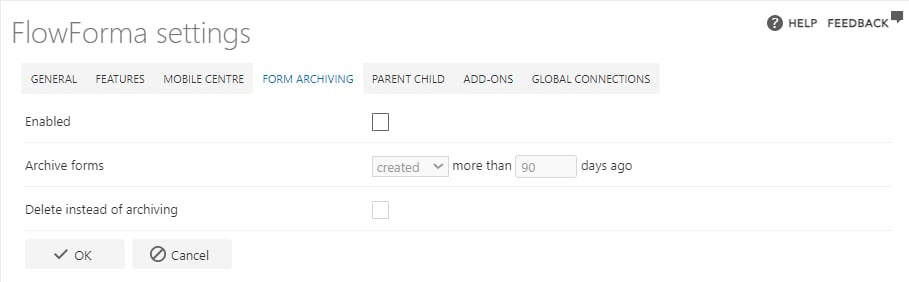 * **Enabled**: allows you to enable or disable the form archiving feature.
* **Archive forms**: the first drop-down allows you to select whether a form is archived after a certain number of days of being
* created
* modified (completed)
* The second section allows you to enter the number of days after a form was created or modified before it is archived (e.g. only archive completed forms that were created more than 90 days ago).
* **Archive folder location**: Once the first form has been archived, this hyperlink will then open the archive folder. The archive folder will also be visible at the bottom of the forms list.
* **Delete instead of archiving**: you can choose to delete the forms instead of archiving them if you do not need to retain them
## Archiving to a list
Previous versions of FlowForma used an option of "archive to a list" which created a SharePoint List, and replicated forms into this list.
It has since been replaced with Archiving to a folder, as it is a more reliable method than the copy and delete process adopted when archiving to a list.
If you were/are using the archiving to a list option, it will remain available to you however it is recommended to switch to archiving to a folder.
**Archiving already enabled to a list**
If you have already enabled archiving to a list, you can enable archiving to a folder.
This will however mean that you will have
1. forms that have already been archived in the original list.
2. forms now archived in a folder.
Therefore in two different locations, to find an archived form you would have to search in two different locations. We are currently seeking a solution for this.
Archiving and OData
In **FlowForma reporting** when you create **OData feed links** you can choose to include or exclude archived forms. If you choose to include archived forms, forms archived to a folder or a list will be included.
Archiving and [FlowForma Collaborate](/product/flowforma-collaborate/overview) (CWM) reports / queues
Any form that has been archived to a folder or a list will not appear in any queues or reports set up in FlowForma Collaborate (CWM) feature.
* **Enabled**: allows you to enable or disable the form archiving feature.
* **Archive forms**: the first drop-down allows you to select whether a form is archived after a certain number of days of being
* created
* modified (completed)
* The second section allows you to enter the number of days after a form was created or modified before it is archived (e.g. only archive completed forms that were created more than 90 days ago).
* **Archive folder location**: Once the first form has been archived, this hyperlink will then open the archive folder. The archive folder will also be visible at the bottom of the forms list.
* **Delete instead of archiving**: you can choose to delete the forms instead of archiving them if you do not need to retain them
## Archiving to a list
Previous versions of FlowForma used an option of "archive to a list" which created a SharePoint List, and replicated forms into this list.
It has since been replaced with Archiving to a folder, as it is a more reliable method than the copy and delete process adopted when archiving to a list.
If you were/are using the archiving to a list option, it will remain available to you however it is recommended to switch to archiving to a folder.
**Archiving already enabled to a list**
If you have already enabled archiving to a list, you can enable archiving to a folder.
This will however mean that you will have
1. forms that have already been archived in the original list.
2. forms now archived in a folder.
Therefore in two different locations, to find an archived form you would have to search in two different locations. We are currently seeking a solution for this.
Archiving and OData
In **FlowForma reporting** when you create **OData feed links** you can choose to include or exclude archived forms. If you choose to include archived forms, forms archived to a folder or a list will be included.
Archiving and [FlowForma Collaborate](/product/flowforma-collaborate/overview) (CWM) reports / queues
Any form that has been archived to a folder or a list will not appear in any queues or reports set up in FlowForma Collaborate (CWM) feature.