> ## Documentation Index
> Fetch the complete documentation index at: https://docs.flowforma.com/llms.txt
> Use this file to discover all available pages before exploring further.
# Creating a document template
> Create a customizable FlowForma Doc Gen template with form field placeholders so your flow can generate dynamic documents from submitted form data.
[Document templates](/product/document-generator/document-templates) let you create a fully customizable template for your documents, with placeholders for form fields, so you can generate dynamic documents from your FlowForma Forms data.
To create a document template:
1. Open the Flow Designer for the flow you want to generate documents for
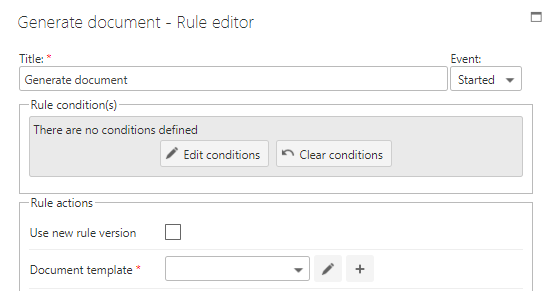
2. Add a **[Generate document](/product/creating-flows/business-rules/business-rule-types/communications-rules/generate-document)** rule, and set **Build template using** to **Word Add-in (modern)**
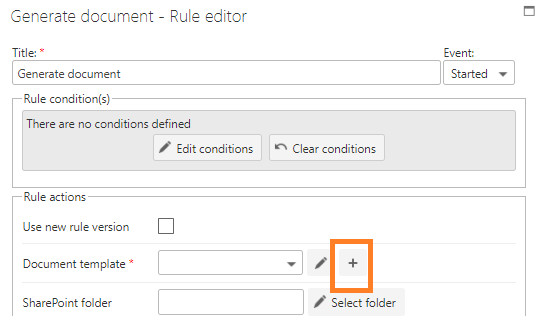
 3. Click the plus icon to add a new template
 4. Provide a unique name for the template and click the tick icon to save it
 5. Once the template is created, click the pencil icon to open it in the Word desktop client
## Open the template in Word Online
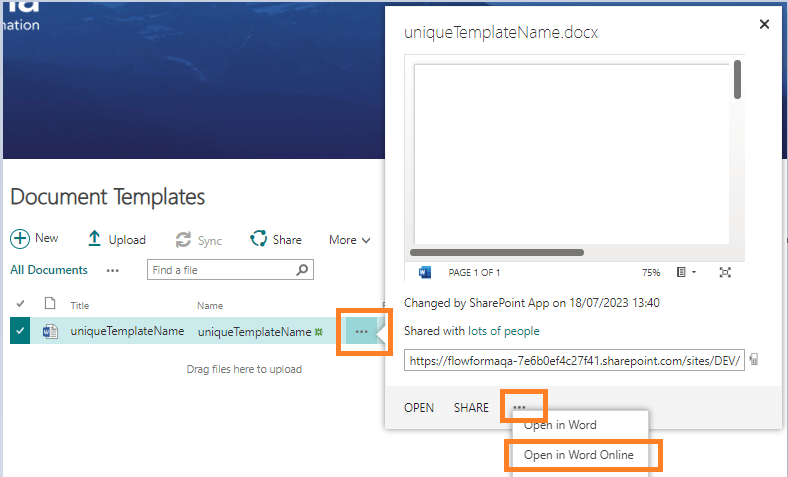
1. Navigate to the **document templates** folder
2. Click the 3 dots by the document name
3. Click the 3 dots on the dialog
4. Select **Open in Word Online**
5. Once the template is created, click the pencil icon to open it in the Word desktop client
## Open the template in Word Online
1. Navigate to the **document templates** folder
2. Click the 3 dots by the document name
3. Click the 3 dots on the dialog
4. Select **Open in Word Online**
 Adding repeating tables to your template is not supported in Word Online.