> ## Documentation Index
> Fetch the complete documentation index at: https://docs.flowforma.com/llms.txt
> Use this file to discover all available pages before exploring further.
# Exporting Charts
> Export FlowForma Analytics charts and data tables to CSV, PDF, Excel, Word, or PowerPoint using the Chart Tools menu, subject to your account permissions.
There are a number of options available for exporting a chart or data table.
These are the available download options:
| Export Option | Icon | Meaning |
| -------------------- | ------------------------------------------------------------------------------------------------------------------------------------------------------------------------------------------------------------------------------------------------------------------------------------------------------------------------------------------------------------------------------------------------------------------------------------------------------------------------------------------------------------------------------------------------------------------------------------------------------------------------------------------------------------------------------------------------------------------------------------------------------------------------------------------------------------------------------------------------------------------------------------------------------------------------------------------------------------------------------------------------------------------------------------------------------------------------------------------------------------------------------------------------------------------------------------------------------------------------------------------------------------------------------------------------------------------------------------------------------------------------------------------------------------------------------------------------------------------------------------------------------------------------------------------------------------------------------------------------------------------------------------------------------------------------------------------------------------------------------------------------------------------------------------------------------------------------------------------------------------------------------------------------------------------------------------------------------------------------------------------------------------------------------------------------------------------------------------------ | ------------------------------------------------------------------------------------------------------------------- |
| Export to CSV |  | Available for charts and data tables. This creates a CSV file that includes your chosen chart or data table. |
| Export to PDF |
| Available for charts and data tables. This creates a CSV file that includes your chosen chart or data table. |
| Export to PDF |  | Available for charts and data tables. This creates a PDF file that includes your chosen chart or data table. |
| Export to Excel |
| Available for charts and data tables. This creates a PDF file that includes your chosen chart or data table. |
| Export to Excel |  | Only available for data tables. This creates an Excel file that includes your chosen data table. |
| Export to Word |
| Only available for data tables. This creates an Excel file that includes your chosen data table. |
| Export to Word |  | Available for charts and data tables. This creates a Word file that includes your chosen chart or data table. |
| Export to PowerPoint |
| Available for charts and data tables. This creates a Word file that includes your chosen chart or data table. |
| Export to PowerPoint |  | Available for charts and data tables. This creates a PowerPoint file that includes your chosen chart or data table. |
You can export a chart or data table by clicking the **Chart Tools** option at the top-right of the chart cell and selecting one of the options from the list.
| Available for charts and data tables. This creates a PowerPoint file that includes your chosen chart or data table. |
You can export a chart or data table by clicking the **Chart Tools** option at the top-right of the chart cell and selecting one of the options from the list.
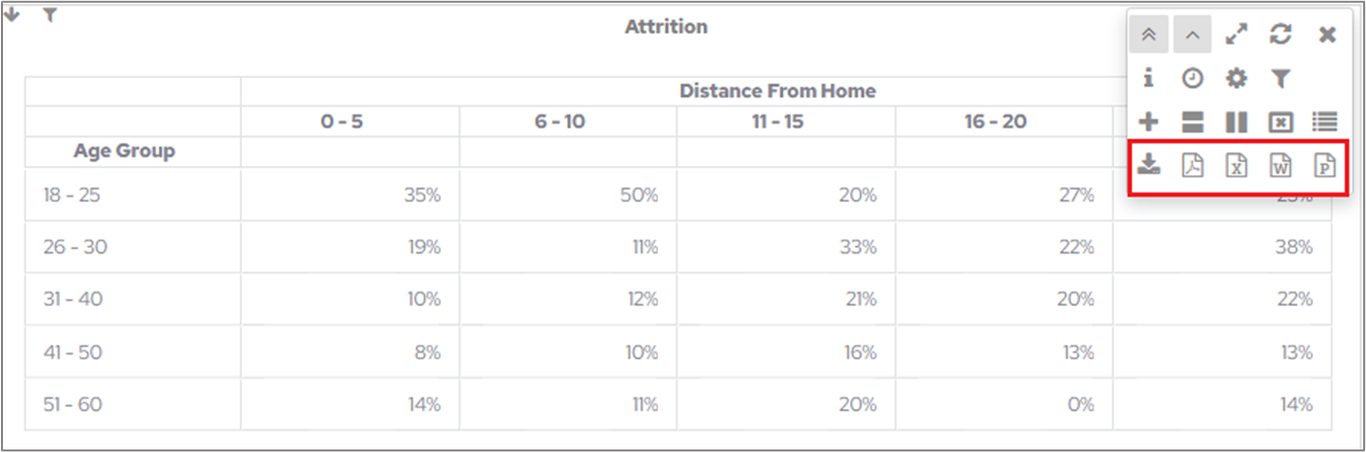 If an option is greyed out or not visible at all, your user account does not have permission to use it. If you think you should be able to export a chart or data table but can't, contact your System Administrator.