> ## Documentation Index
> Fetch the complete documentation index at: https://docs.flowforma.com/llms.txt
> Use this file to discover all available pages before exploring further.
# Is there a way I can see what permissions I have?
> Check your FlowForma Analytics dashboard permissions from the More Options menu, where the User Privileges section shows enabled, disabled, and unavailable rights.
Your System Administrator chooses your permissions when they create your account. This article explains how to check what permissions you have.
## Instructions
1. Click **More Options** at the top-right of the Dashboard.
 2. Click your name. The **User Privileges** section shows what permissions you have in the system.
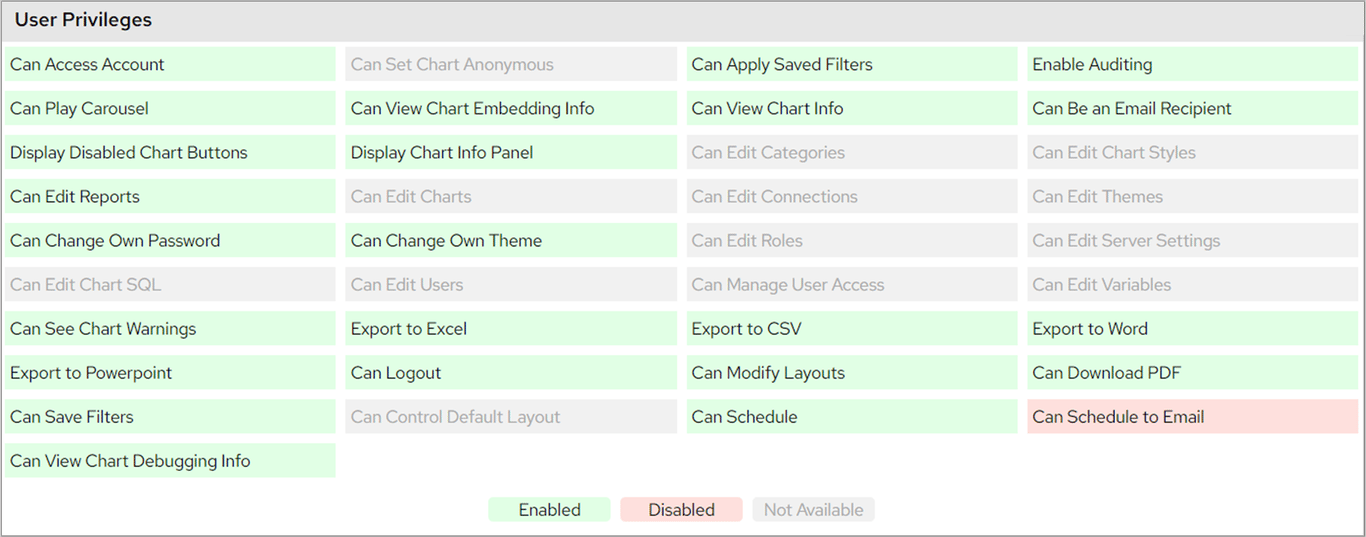 This section shows which permissions you have (green), which have been disabled (pink), and which are unavailable (grey) for your type of user account.