> ## Documentation Index
> Fetch the complete documentation index at: https://docs.flowforma.com/llms.txt
> Use this file to discover all available pages before exploring further.

# Adding Analytics page

> Add a FlowForma Analytics page to your site using the Apps page template, then set its title and category, with an optional full-screen WebView mode.

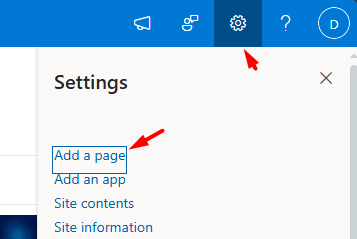
To add an Analytics page, click the **Cogwheel** icon and select **Add a page**.
<img src="https://mintcdn.com/flowforma/v8UMuZxCjEz54jQV/images/product/flowforma-analytics/adding-analytics-page/adding-analytics-page-1.png?fit=max&auto=format&n=v8UMuZxCjEz54jQV&q=85&s=ff647eaf43e8fa2fa1f3363dd926777a" alt="Add a page menu" width="357" height="239" data-path="images/product/flowforma-analytics/adding-analytics-page/adding-analytics-page-1.png" />

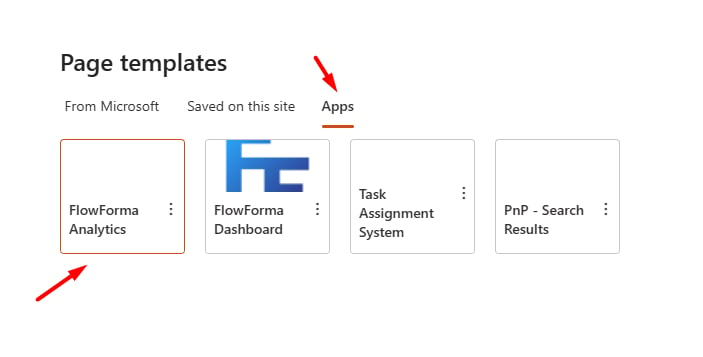
In the page templates, select the **Apps** tab and choose **[FlowForma Analytics](/product/flowforma-analytics/overview)**.
<img src="https://mintcdn.com/flowforma/v8UMuZxCjEz54jQV/images/product/flowforma-analytics/adding-analytics-page/adding-analytics-page-2.png?fit=max&auto=format&n=v8UMuZxCjEz54jQV&q=85&s=d95298f07ad1f409133eafc1c1963b55" alt="FlowForma Analytics app template" width="703" height="357" data-path="images/product/flowforma-analytics/adding-analytics-page/adding-analytics-page-2.png" />

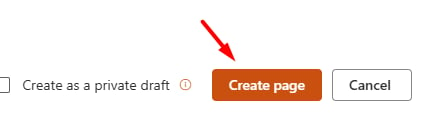
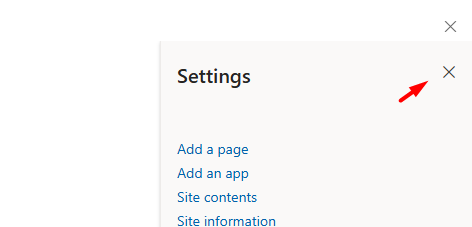
Close the settings menu on the right side and click **Create page**.
<img src="https://mintcdn.com/flowforma/v8UMuZxCjEz54jQV/images/product/flowforma-analytics/adding-analytics-page/adding-analytics-page-3.png?fit=max&auto=format&n=v8UMuZxCjEz54jQV&q=85&s=99fa5c653ea05edd112a807682dedc21" alt="Settings menu" width="472" height="227" data-path="images/product/flowforma-analytics/adding-analytics-page/adding-analytics-page-3.png" />

<img src="https://mintcdn.com/flowforma/v8UMuZxCjEz54jQV/images/product/flowforma-analytics/adding-analytics-page/adding-analytics-page-4.png?fit=max&auto=format&n=v8UMuZxCjEz54jQV&q=85&s=ed479e94ab0f1b0bb26b77c81528f22c" alt="Create page button" width="425" height="113" data-path="images/product/flowforma-analytics/adding-analytics-page/adding-analytics-page-4.png" />

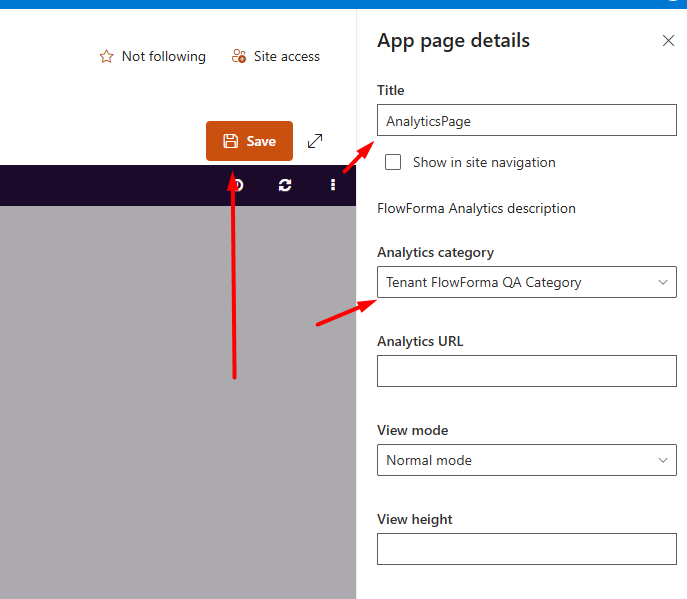
Add a **Title**, pick a category, and click **Save**.
<img src="https://mintcdn.com/flowforma/4IWeidTFoUl--D6r/images/product/flowforma-analytics/adding-analytics-page/adding-analytics-page-5.png?fit=max&auto=format&n=4IWeidTFoUl--D6r&q=85&s=7e6e696eb71d484861505494bc85c24a" alt="Add title and category" width="687" height="599" data-path="images/product/flowforma-analytics/adding-analytics-page/adding-analytics-page-5.png" />

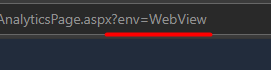
Bonus: to view the page in fullscreen, add the `?env=WebView` parameter to the URL.
<img src="https://mintcdn.com/flowforma/4IWeidTFoUl--D6r/images/product/flowforma-analytics/adding-analytics-page/adding-analytics-page-6.png?fit=max&auto=format&n=4IWeidTFoUl--D6r&q=85&s=890ff432f5bca507a7f8ecf6a8a36445" alt="WebView url parameter" width="271" height="70" data-path="images/product/flowforma-analytics/adding-analytics-page/adding-analytics-page-6.png" />