> ## Documentation Index
> Fetch the complete documentation index at: https://docs.flowforma.com/llms.txt
> Use this file to discover all available pages before exploring further.
# Summarisation Feedback
> Use the Summarisation Feedback question to let users rate an AI summary with Like and Dislike buttons, helping FlowForma improve future summaries.
This question requires the **[AI Assistants](/product/creating-flows/business-rules/business-rule-types/ai-assistants/overview)** feature to be enabled in **FlowForma Settings > Features**.
The [Summarisation](/product/creating-flows/business-rules/business-rule-types/ai-assistants/summarisation) Feedback question lets users tell FlowForma whether they liked or disliked an AI-generated summary.
This feedback helps us improve the summarisation tool over time.
 ## Form view
 The question appears on the form as a button-type question, with **Like** and **Dislike** buttons.
## Question configuration
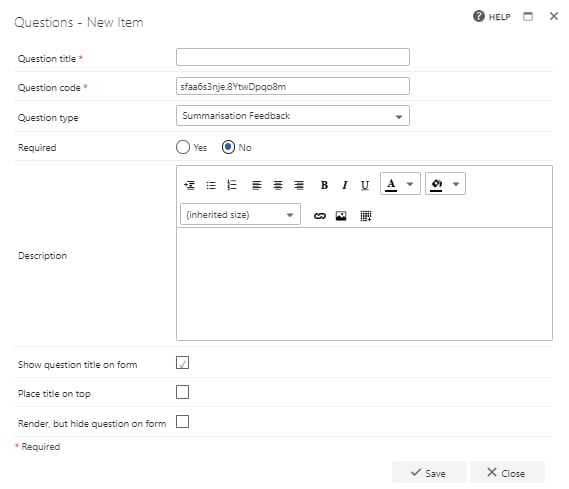
**Question title**: each question must have a title. It's a required field and will appear on the form as a label when the user fills in the question
**Question code**: each question needs a unique code. One is generated by default when you start creating a new question, but you can overwrite this and give it a different code, if you prefer. The question code won't appear on the form itself, but you can use it to search and filter by when adding questions
**Question type**: Summarisation Feedback
**Required**: you need to specify whether the question is required or not. If you set a question as required, the user must provide an answer to it on the form in order to be able to submit the form. However, the user can save as draft without answering all required questions. If you try to submit a form without answering all required questions, an error message will appear showing a list of questions that haven't been answered
**Question description**: it's optional whether you enter a description or not. The description is used as a tooltip on the form and will add an exclamation point beside the question on the form. If the user clicks on the exclamation point, the description (tool tip) will appear
**Show question title on form**: check this option if you want to display the question's title to the left of the actual input field. If you uncheck this option, the input field is moved out to the left and appears right under the other questions/question titles
**Place title on top**: check this option to display the question's title above the input field. If you uncheck this option, the title appears to the left of the input field, as normal
**Render, but hide question on form**: if you check this option, the question will behave as shown by default (default value, publishing and calculation will apply). However, the question will not be displayed on the form
Once you've entered all relevant information, click **save**. If you don't want to save the question or the changes you've made, simply click **close**.
The question appears on the form as a button-type question, with **Like** and **Dislike** buttons.
## Question configuration
**Question title**: each question must have a title. It's a required field and will appear on the form as a label when the user fills in the question
**Question code**: each question needs a unique code. One is generated by default when you start creating a new question, but you can overwrite this and give it a different code, if you prefer. The question code won't appear on the form itself, but you can use it to search and filter by when adding questions
**Question type**: Summarisation Feedback
**Required**: you need to specify whether the question is required or not. If you set a question as required, the user must provide an answer to it on the form in order to be able to submit the form. However, the user can save as draft without answering all required questions. If you try to submit a form without answering all required questions, an error message will appear showing a list of questions that haven't been answered
**Question description**: it's optional whether you enter a description or not. The description is used as a tooltip on the form and will add an exclamation point beside the question on the form. If the user clicks on the exclamation point, the description (tool tip) will appear
**Show question title on form**: check this option if you want to display the question's title to the left of the actual input field. If you uncheck this option, the input field is moved out to the left and appears right under the other questions/question titles
**Place title on top**: check this option to display the question's title above the input field. If you uncheck this option, the title appears to the left of the input field, as normal
**Render, but hide question on form**: if you check this option, the question will behave as shown by default (default value, publishing and calculation will apply). However, the question will not be displayed on the form
Once you've entered all relevant information, click **save**. If you don't want to save the question or the changes you've made, simply click **close**.