> ## Documentation Index
> Fetch the complete documentation index at: https://docs.flowforma.com/llms.txt
> Use this file to discover all available pages before exploring further.
# JSON Text Question
> Learn how to feed a choice question with dynamic values by mapping a JSON API response held in a hidden multiple lines of text question.
To display dynamic choice values driven by a JSON API response, use a Multiple Lines of Text question, hidden by default, that is populated with the response of an API call.
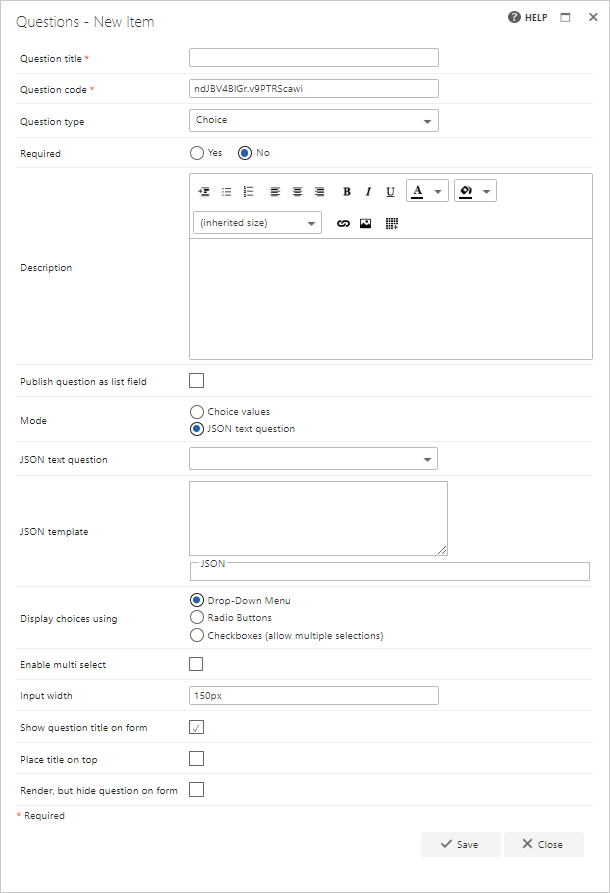 When setting up the [Choice question](/product/creating-flows/questions/question-types/choice-question/overview), selecting the "JSON text question" mode displays two new options to configure:
**JSON text question**: select the Multiple Lines of Text question that will contain the JSON response from your API call.
**JSON template**: paste a sample response from the API call into the template section so it can be read and displayed as a tree, letting you select which elements to display as choice options. This is only used to create the mapping between the response and the choice values; in a real form, the JSON text question will contain different values, and the choice values will reflect the data returned.
When setting up the [Choice question](/product/creating-flows/questions/question-types/choice-question/overview), selecting the "JSON text question" mode displays two new options to configure:
**JSON text question**: select the Multiple Lines of Text question that will contain the JSON response from your API call.
**JSON template**: paste a sample response from the API call into the template section so it can be read and displayed as a tree, letting you select which elements to display as choice options. This is only used to create the mapping between the response and the choice values; in a real form, the JSON text question will contain different values, and the choice values will reflect the data returned.
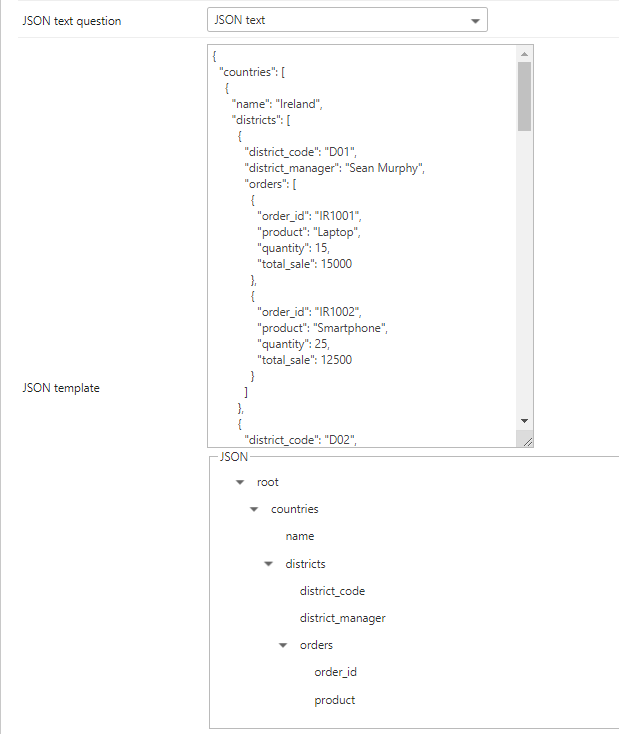 Select the element you want displayed as choice values after the API call is made. Once the Multiple Lines of Text question is updated with a value, the choice question automatically detects the change and updates the available choices.
By default, no choices are displayed when the form is first loaded, until the JSON text question is populated.
Select the element you want displayed as choice values after the API call is made. Once the Multiple Lines of Text question is updated with a value, the choice question automatically detects the change and updates the available choices.
By default, no choices are displayed when the form is first loaded, until the JSON text question is populated.
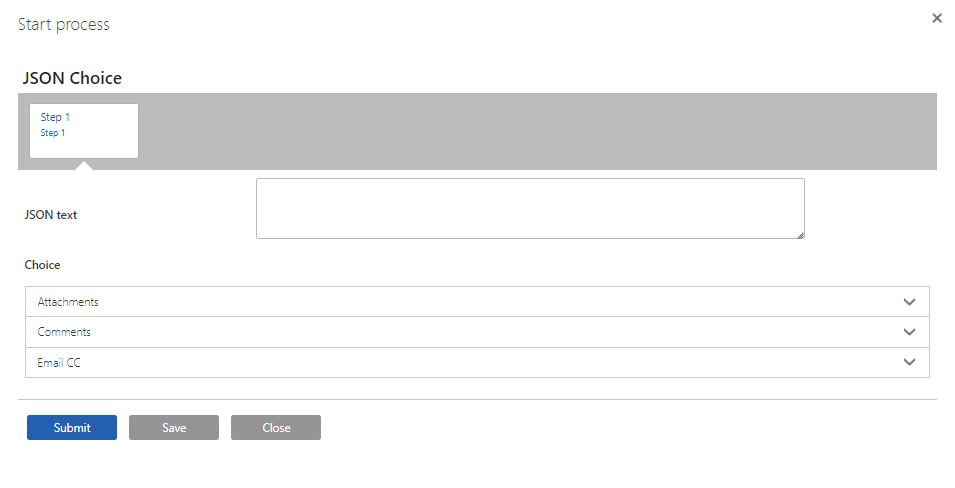 Once the API is called and a response is received, the choice values appear. Below, "name" was chosen in the mapping, so the country names appear.
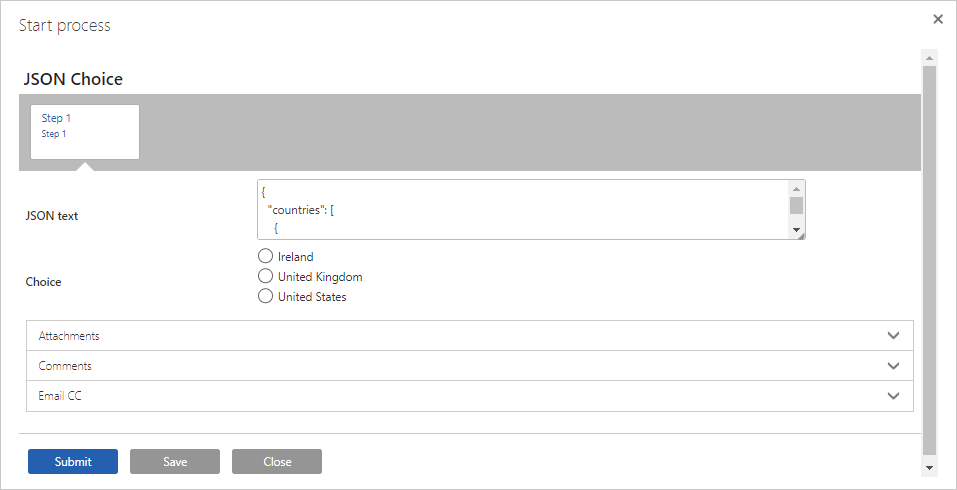 Below, "product" was chosen, so the product names appear.
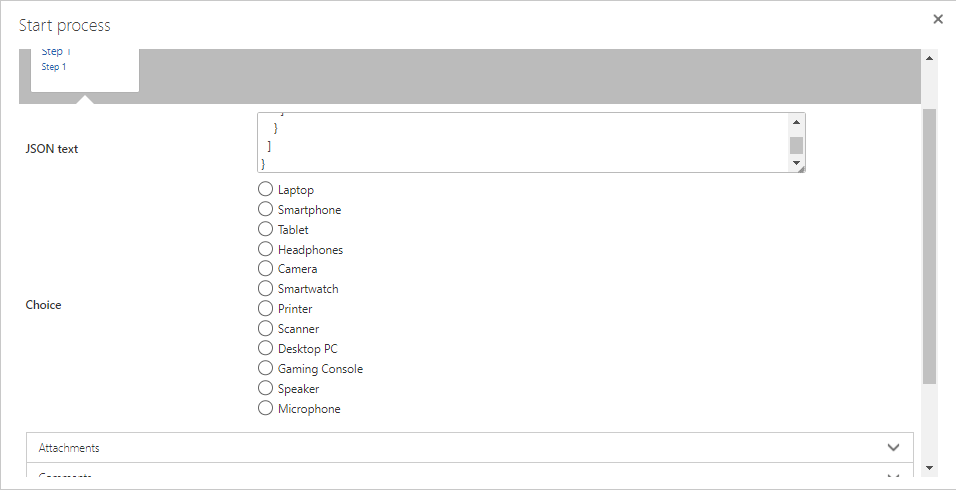 The "JSON text" question can be hidden by default, so users do not need to see the raw JSON.
The JSON used in this example can be seen below
```json theme={null}
{
"countries": [
{
"name": "Ireland",
"districts": [
{
"district_code": "D01",
"district_manager": "Sean Murphy",
"orders": [
{
"order_id": "IR1001",
"product": "Laptop",
"quantity": 15,
"total_sale": 15000
},
{
"order_id": "IR1002",
"product": "Smartphone",
"quantity": 25,
"total_sale": 12500
}
]
},
{
"district_code": "D02",
"district_manager": "Aisling Byrne",
"orders": [
{
"order_id": "IR2001",
"product": "Tablet",
"quantity": 20,
"total_sale": 10000
},
{
"order_id": "IR2002",
"product": "Headphones",
"quantity": 30,
"total_sale": 9000
}
]
}
]
},
{
"name": "United Kingdom",
"districts": [
{
"district_code": "L01",
"district_manager": "Emma Thompson",
"orders": [
{
"order_id": "UK1001",
"product": "Camera",
"quantity": 10,
"total_sale": 20000
},
{
"order_id": "UK1002",
"product": "Smartwatch",
"quantity": 40,
"total_sale": 16000
}
]
},
{
"district_code": "L02",
"district_manager": "James Smith",
"orders": [
{
"order_id": "UK2001",
"product": "Printer",
"quantity": 15,
"total_sale": 7500
},
{
"order_id": "UK2002",
"product": "Scanner",
"quantity": 20,
"total_sale": 10000
}
]
}
]
},
{
"name": "United States",
"districts": [
{
"district_code": "N01",
"district_manager": "Robert Jones",
"orders": [
{
"order_id": "US1001",
"product": "Desktop PC",
"quantity": 5,
"total_sale": 25000
},
{
"order_id": "US1002",
"product": "Gaming Console",
"quantity": 10,
"total_sale": 5000
}
]
},
{
"district_code": "N02",
"district_manager": "Jane Smith",
"orders": [
{
"order_id": "US2001",
"product": "Speaker",
"quantity": 20,
"total_sale": 20000
},
{
"order_id": "US2002",
"product": "Microphone",
"quantity": 15,
"total_sale": 15000
}
]
}
]
}
]
}
```
The "JSON text" question can be hidden by default, so users do not need to see the raw JSON.
The JSON used in this example can be seen below
```json theme={null}
{
"countries": [
{
"name": "Ireland",
"districts": [
{
"district_code": "D01",
"district_manager": "Sean Murphy",
"orders": [
{
"order_id": "IR1001",
"product": "Laptop",
"quantity": 15,
"total_sale": 15000
},
{
"order_id": "IR1002",
"product": "Smartphone",
"quantity": 25,
"total_sale": 12500
}
]
},
{
"district_code": "D02",
"district_manager": "Aisling Byrne",
"orders": [
{
"order_id": "IR2001",
"product": "Tablet",
"quantity": 20,
"total_sale": 10000
},
{
"order_id": "IR2002",
"product": "Headphones",
"quantity": 30,
"total_sale": 9000
}
]
}
]
},
{
"name": "United Kingdom",
"districts": [
{
"district_code": "L01",
"district_manager": "Emma Thompson",
"orders": [
{
"order_id": "UK1001",
"product": "Camera",
"quantity": 10,
"total_sale": 20000
},
{
"order_id": "UK1002",
"product": "Smartwatch",
"quantity": 40,
"total_sale": 16000
}
]
},
{
"district_code": "L02",
"district_manager": "James Smith",
"orders": [
{
"order_id": "UK2001",
"product": "Printer",
"quantity": 15,
"total_sale": 7500
},
{
"order_id": "UK2002",
"product": "Scanner",
"quantity": 20,
"total_sale": 10000
}
]
}
]
},
{
"name": "United States",
"districts": [
{
"district_code": "N01",
"district_manager": "Robert Jones",
"orders": [
{
"order_id": "US1001",
"product": "Desktop PC",
"quantity": 5,
"total_sale": 25000
},
{
"order_id": "US1002",
"product": "Gaming Console",
"quantity": 10,
"total_sale": 5000
}
]
},
{
"district_code": "N02",
"district_manager": "Jane Smith",
"orders": [
{
"order_id": "US2001",
"product": "Speaker",
"quantity": 20,
"total_sale": 20000
},
{
"order_id": "US2002",
"product": "Microphone",
"quantity": 15,
"total_sale": 15000
}
]
}
]
}
]
}
```