> ## Documentation Index
> Fetch the complete documentation index at: https://docs.flowforma.com/llms.txt
> Use this file to discover all available pages before exploring further.
# Date of Birth
> Use the Date of Birth add-on question to capture a date of birth in one structured field, with configurable date format, month display, and default start year.
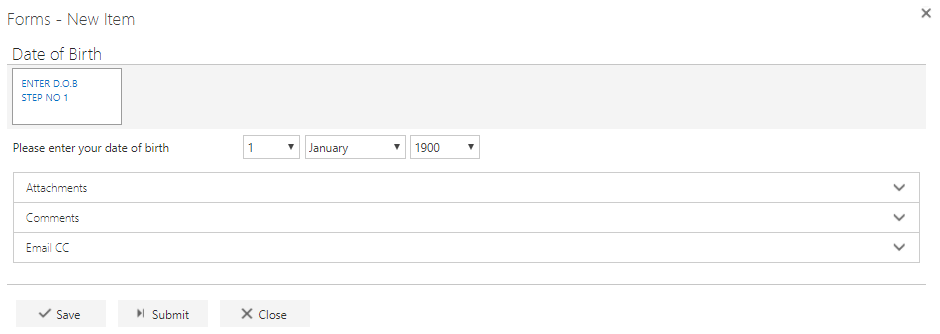
The Date of Birth add-on question allows the user to enter their date of birth in a single structured question. This removes the need to mimic that behavior using multiple questions with a custom layout or repeating table.
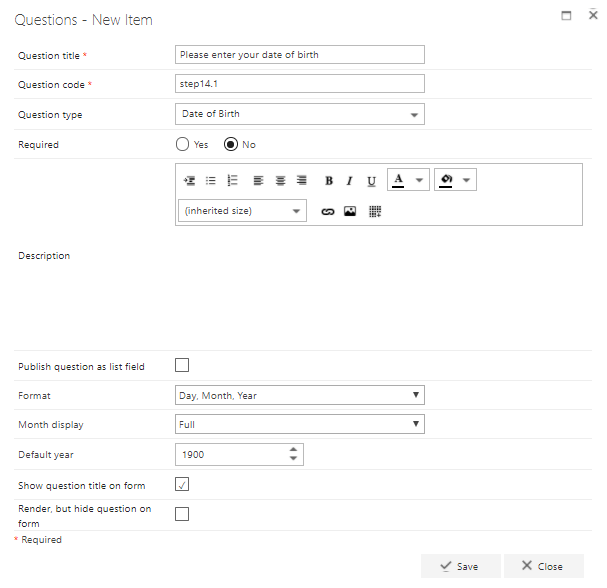 **Question title**: each question must have a title. It's a required field and will appear on the form as a label when the user fills in the question
**Question code**: each question needs a unique code. One is generated by default when you start creating a new question, but you can overwrite this and give it a different code, if you prefer. The question code won't appear on the form itself, but you can use it to search and filter by when adding questions
**Question type**: Date of Birth
**Required**: specify whether the question is required. If you set a question as required, the user must answer it before they can submit the form. However, the user can save as draft without answering all required questions. If they try to submit the form without answering all required questions, an error message appears listing the questions that haven't been answered
**Question description**: entering a description is optional. The description is used as a tooltip on the form and adds an exclamation point beside the question. If the user clicks the exclamation point, the description (tooltip) appears
**Publish question as list field**: check this box to save the question to the SharePoint forms list. This allows you to report on the question from there
**Format**: choose whether the date is displayed as day/month/year, month/day/year, or year/month/day
**Month Display**: choose whether the months are displayed as "full" or "compact" - for example, "January" or "Jan"
**Default year**: choose the starting year for the year drop-down menu. For example, if it's set to 1900, users can select any year between 1900 and the current year
**Show question title on form**: check this option to display the question's title to the left of the input field. If you uncheck this option, the input field moves to the left and appears directly under the other questions/question titles
**Place title on top**: check this option to display the question's title above the input field. If you uncheck this option, the title appears to the left of the input field, as normal
**Render, but hide question on form**: if you check this option, the question will behave as shown by default (default value, publishing and calculation will apply). However, the question will not be displayed on the form
Once you've entered all relevant information, click **save**. If you don't want to save the question or the changes you've made, simply click **close**