> ## Documentation Index
> Fetch the complete documentation index at: https://docs.flowforma.com/llms.txt
> Use this file to discover all available pages before exploring further.
# Flow designer
> The Flow designer is FlowForma's main build tool for editing flow settings and adding, editing, and removing steps, questions, and business rules in a flow.
The flow designer is the main tool you need when building flows. Once you've defined the flow, you can use the flow designer to build everything else, including:
* Edit flow settings
* Add, edit, and remove steps
* Add, edit, and remove flow questions
* Add, edit, and remove business rules to the flow, steps, and questions
* License and unlicense the flow
When you make changes to a flow, you must click **save** for the changes to be applied. It's best practice to save the flow regularly while you're working on it.
To access the flow designer, click **Edit existing process flow** from the quick launch menu. Click on the relevant flow, and it will open in the flow designer.
 ## What's what in the flow designer
There are many actions within the flow designer:
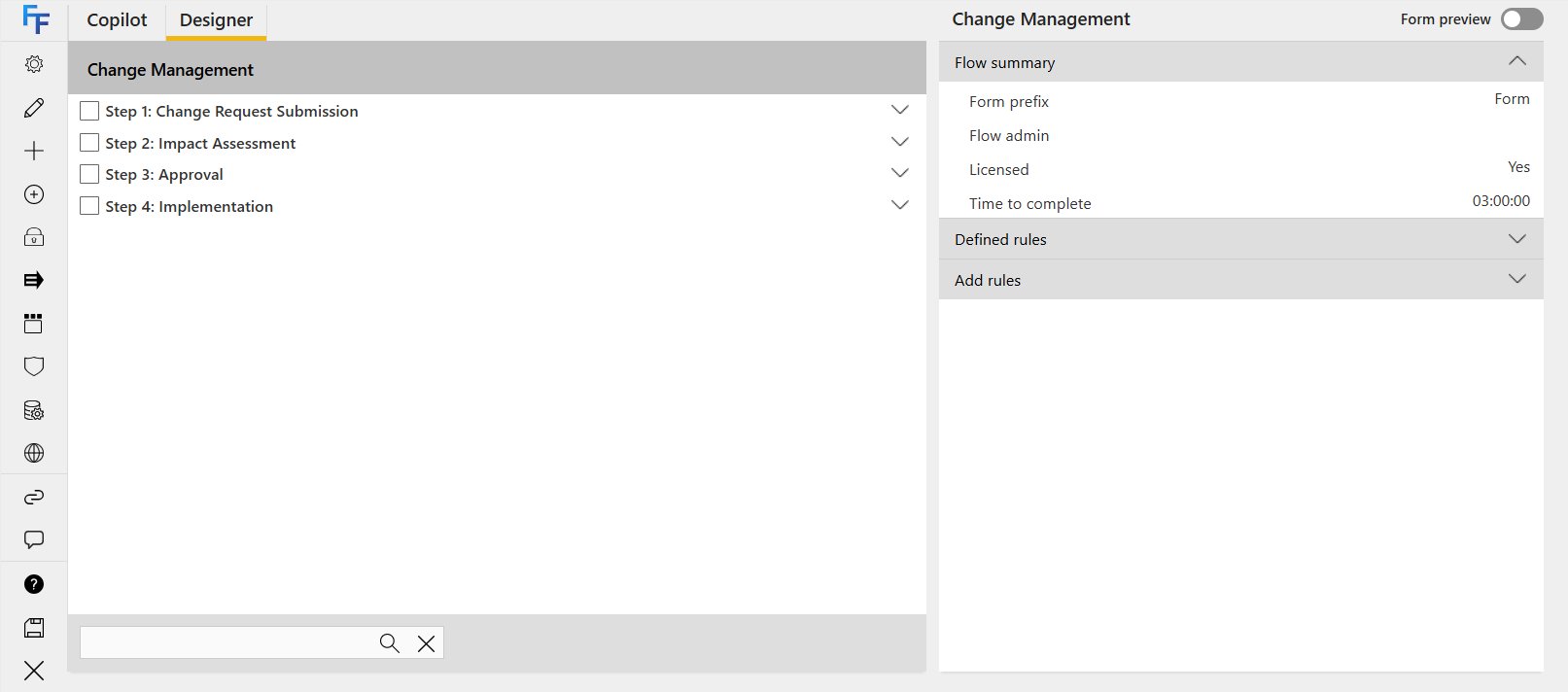
1. The first part of the screen is the flow itself. At the very top you see the flow's name. Below that you'll see steps (in bold); they all have a check-box beside them.
2. A parallel group is highlighted in blue and contains the words "parallel group" as part of the name. The questions within each step are indented and also have check-boxes beside them. You can use drag-and-drop to move steps and questions around.
3. Use the arrows to expand or collapse the contents of a flow, step, or parallel group.
4. Click **X** to exit the flow. Any changes you haven't saved will be lost.
5. The options panel is split into four sections and is context sensitive. The options vary depending on whether you've selected the flow, a step, a parallel group, or a question. This is described in more detail below.
6. Whenever you make changes to the flow, remember to click **save** if you want to submit the changes; alternatively click **close** (this won't save any unsaved changes, but you'll be prompted to confirm, to avoid accidentally closing the flow designer).
7. You can use the search box to search rules and questions by their names or codes (for example: Question - Holiday Request Details, Rule - Hide Step Date). Note: searching for footer questions within a repeating table isn't supported.
## Toolbar
The first part of the options panel is a **toolbar**:
| Icon | Name | Details | Flow | Step | Parallel step | Question |
| --------------------------------------------------------------------------------------------------------------------------------------------------------------------------------------------------------------------------------------------------------------------------------------------------------------------------------------------------------------------------------------------------------------------------------------------------------------------------------------------------------------------------------------------------------------------------------------------------------------------------------------------------------------------------------------------------------------------------------------------------------------------------------------------------------------------------------------------------------------------------------------------------------------------------------------------------------------------------------------------------------------------------------------------------------------------------------------------------------------------------------------------------------------------------------------------------------------------------------------------------------------------------------------------------------------------------------------------------------------------------------------------------------------------------------------------------------------------------------------------------------------------------------------------------------------------------------------------------------------------------------------------------------------------------------------------------------------------------------------------------------------------------------------------------------------------------------------------------------------------------------------------------------------- | --------------------------------------------------------------------------------- | ---------------------------------------------------------------------------------------------------------------------------------------------------------------------------------------------------------------------------------------------------------------------- | ---- | ---- | ------------- | -------- |
|
## What's what in the flow designer
There are many actions within the flow designer:
1. The first part of the screen is the flow itself. At the very top you see the flow's name. Below that you'll see steps (in bold); they all have a check-box beside them.
2. A parallel group is highlighted in blue and contains the words "parallel group" as part of the name. The questions within each step are indented and also have check-boxes beside them. You can use drag-and-drop to move steps and questions around.
3. Use the arrows to expand or collapse the contents of a flow, step, or parallel group.
4. Click **X** to exit the flow. Any changes you haven't saved will be lost.
5. The options panel is split into four sections and is context sensitive. The options vary depending on whether you've selected the flow, a step, a parallel group, or a question. This is described in more detail below.
6. Whenever you make changes to the flow, remember to click **save** if you want to submit the changes; alternatively click **close** (this won't save any unsaved changes, but you'll be prompted to confirm, to avoid accidentally closing the flow designer).
7. You can use the search box to search rules and questions by their names or codes (for example: Question - Holiday Request Details, Rule - Hide Step Date). Note: searching for footer questions within a repeating table isn't supported.
## Toolbar
The first part of the options panel is a **toolbar**:
| Icon | Name | Details | Flow | Step | Parallel step | Question |
| --------------------------------------------------------------------------------------------------------------------------------------------------------------------------------------------------------------------------------------------------------------------------------------------------------------------------------------------------------------------------------------------------------------------------------------------------------------------------------------------------------------------------------------------------------------------------------------------------------------------------------------------------------------------------------------------------------------------------------------------------------------------------------------------------------------------------------------------------------------------------------------------------------------------------------------------------------------------------------------------------------------------------------------------------------------------------------------------------------------------------------------------------------------------------------------------------------------------------------------------------------------------------------------------------------------------------------------------------------------------------------------------------------------------------------------------------------------------------------------------------------------------------------------------------------------------------------------------------------------------------------------------------------------------------------------------------------------------------------------------------------------------------------------------------------------------------------------------------------------------------------------------------------------- | --------------------------------------------------------------------------------- | ---------------------------------------------------------------------------------------------------------------------------------------------------------------------------------------------------------------------------------------------------------------------- | ---- | ---- | ------------- | -------- |
|  | Settings | View and modify the flow or step settings. This includes general settings, custom layouts, etc. Note: it also modifies the step properties. | x | x | | |
|
| Settings | View and modify the flow or step settings. This includes general settings, custom layouts, etc. Note: it also modifies the step properties. | x | x | | |
|  | Properties | View or modify the flow or question properties. | x | | | x |
|
| Properties | View or modify the flow or question properties. | x | | | x |
|  | Unlicense flow | Click to unlicense the flow. The flow remains in the system but can't be used for submitting new forms. | x | | | |
|
| Unlicense flow | Click to unlicense the flow. The flow remains in the system but can't be used for submitting new forms. | x | | | |
|  | Activate flow | Click to activate the flow. Only active flows can be used for submitting new forms. | x | | | |
|
| Activate flow | Click to activate the flow. Only active flows can be used for submitting new forms. | x | | | |
|  | Set execution in series | This option allows you to set the rule execution order to series, so rules execute one-by-one rather than all at once. If you see this icon, rules are currently executing in parallel. | x | x | | x |
|
| Set execution in series | This option allows you to set the rule execution order to series, so rules execute one-by-one rather than all at once. If you see this icon, rules are currently executing in parallel. | x | x | | x |
|  | Set execution in parallel | This option allows you to set the rule execution order to parallel, so rules execute at the same time rather than one-by-one. If you see this icon, rules are currently executing in series. | x | x | | x |
|
| Set execution in parallel | This option allows you to set the rule execution order to parallel, so rules execute at the same time rather than one-by-one. If you see this icon, rules are currently executing in series. | x | x | | x |
|  | Remove checked item(s) | Used to remove steps and/or questions. Check the relevant items first, then click **X** in the toolbar. The items are removed from this flow, but can still be used elsewhere. | | x | x | x |
|
| Remove checked item(s) | Used to remove steps and/or questions. Check the relevant items first, then click **X** in the toolbar. The items are removed from this flow, but can still be used elsewhere. | | x | x | x |
|  | Add a new step / Add a new question | Click directly on the **+ step** button to add a new step. | x | | | |
|
| Add a new step / Add a new question | Click directly on the **+ step** button to add a new step. | x | | | |
|  | Flow: Add existing step(s) / Add a parallel group. Step: Add existing question(s) | Adding existing steps will also add all questions that are inside that step. | x | x | | |
|
| Flow: Add existing step(s) / Add a parallel group. Step: Add existing question(s) | Adding existing steps will also add all questions that are inside that step. | x | x | | |
|  | Disable | Check the relevant items first, then click **disable** in the toolbar. The items are shown but not editable when creating a form. You can use this to set their default value (for example, current user or current date), and then their value can't be changed. | | x | | x |
|
| Disable | Check the relevant items first, then click **disable** in the toolbar. The items are shown but not editable when creating a form. You can use this to set their default value (for example, current user or current date), and then their value can't be changed. | | x | | x |
|  | Enable | Check the relevant disabled items first, then click **enable** in the toolbar. The items become editable when creating a form again. | | x | | x |
|
| Enable | Check the relevant disabled items first, then click **enable** in the toolbar. The items become editable when creating a form again. | | x | | x |
|  | Hide | Check the relevant items first, then click **hide** in the toolbar. This will hide a step or question so they don't appear in the form. The answer to a question might trigger other questions or steps to be irrelevant, in which case you might decide to hide them. | | x | | x |
|
| Hide | Check the relevant items first, then click **hide** in the toolbar. This will hide a step or question so they don't appear in the form. The answer to a question might trigger other questions or steps to be irrelevant, in which case you might decide to hide them. | | x | | x |
|  | Show | By default, all steps and questions show. However, if you've hidden a step or question and want to show it again, select the check-box beside the relevant item and click **show**. | | x | | x |
|
| Show | By default, all steps and questions show. However, if you've hidden a step or question and want to show it again, select the check-box beside the relevant item and click **show**. | | x | | x |
|  | Required | By default, all questions are set to not be required; you can toggle the required setting using this icon. | | | | x |
|
| Required | By default, all questions are set to not be required; you can toggle the required setting using this icon. | | | | x |
|  | Add flow steps into parallel group | Used to add steps into a parallel group. Check the relevant steps, then click **add flow steps into parallel group**. | | | x | |
|
| Add flow steps into parallel group | Used to add steps into a parallel group. Check the relevant steps, then click **add flow steps into parallel group**. | | | x | |
|  | Remove parallel steps from group | Used to remove steps from a parallel group. Check the relevant steps, then click **remove parallel steps from group**. | | | x | |
|
| Remove parallel steps from group | Used to remove steps from a parallel group. Check the relevant steps, then click **remove parallel steps from group**. | | | x | |
|  | Open Visual Form Designer | Used to open up the Visual Form Designer | x | | | |
|
| Open Visual Form Designer | Used to open up the Visual Form Designer | x | | | |
|  | Open Security Wizard | Used to open the Security Wizard | x | | | |
|
| Open Security Wizard | Used to open the Security Wizard | x | | | |
|  | Open Entity Data Manager\* | Used to open the Entity Data Manager | x | | | |
|
| Open Entity Data Manager\* | Used to open the Entity Data Manager | x | | | |
|  | Open CX\* | Used to open the CX panel to manage the accessibility of the form. | x | | | |
\* these icons will only appear if the feature has been activated on the site
## Summary
The second part of the options panel is the **summary**. The summary varies depending on whether you're viewing a flow, step, question, or sub-question in a repeating table. The summary is always read-only and only displays high-level information.
| Open CX\* | Used to open the CX panel to manage the accessibility of the form. | x | | | |
\* these icons will only appear if the feature has been activated on the site
## Summary
The second part of the options panel is the **summary**. The summary varies depending on whether you're viewing a flow, step, question, or sub-question in a repeating table. The summary is always read-only and only displays high-level information.
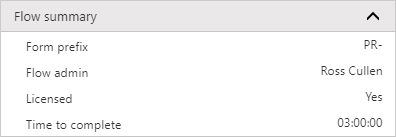 **Form prefix**: displays the prefix used to name forms created for this flow; it's concatenated with the form ID, for example "PR-1"
**Flow admin**: displays the name of the person or group set as the flow administrator for this flow
**Licensed**: displays if the flow is currently licensed or unlicensed
**Time to complete**: displays the time set as the time to complete for forms created for this flow
**Form prefix**: displays the prefix used to name forms created for this flow; it's concatenated with the form ID, for example "PR-1"
**Flow admin**: displays the name of the person or group set as the flow administrator for this flow
**Licensed**: displays if the flow is currently licensed or unlicensed
**Time to complete**: displays the time set as the time to complete for forms created for this flow
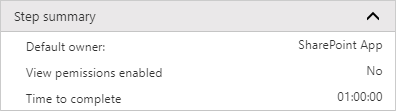 **Default owner**: displays the name of the person or group assigned to complete this step by default
**View permissions enabled**: displays if step view permissions are enabled for this step
**Note:** it's recommended to use the Security Wizard; step view permissions are an outdated method of securing a step.
**Time to complete:** displays the time set as the time to complete for the selected step
**Default owner**: displays the name of the person or group assigned to complete this step by default
**View permissions enabled**: displays if step view permissions are enabled for this step
**Note:** it's recommended to use the Security Wizard; step view permissions are an outdated method of securing a step.
**Time to complete:** displays the time set as the time to complete for the selected step
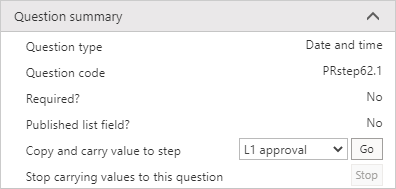 **Question type**: displays the question type of the selected question
**Question code:** displays the question code of the selected question
**Required:** displays if the selected question is a required question
**Published list field:** displays if the selected question is being published as a list field on the forms list
**Copy and carry value to step:** allows you to copy this question's value to the same question on another step
**Stop carrying values to this question:** if the selected question is being copied and carried to another step, you can click stop to stop this
## Defined rules
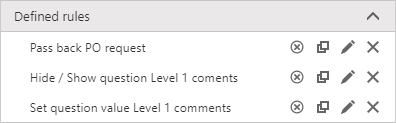
The **defined rules** are context specific, so what you see relates directly to the flow, step, or question. If no rules have been defined for the relevant item, nothing will appear when you click on the drop-down arrow.
You can do the following directly from this menu:
* **disable/enable rule**
* **copy rule**
* **edit rule**
* **delete rule**
**Question type**: displays the question type of the selected question
**Question code:** displays the question code of the selected question
**Required:** displays if the selected question is a required question
**Published list field:** displays if the selected question is being published as a list field on the forms list
**Copy and carry value to step:** allows you to copy this question's value to the same question on another step
**Stop carrying values to this question:** if the selected question is being copied and carried to another step, you can click stop to stop this
## Defined rules
The **defined rules** are context specific, so what you see relates directly to the flow, step, or question. If no rules have been defined for the relevant item, nothing will appear when you click on the drop-down arrow.
You can do the following directly from this menu:
* **disable/enable rule**
* **copy rule**
* **edit rule**
* **delete rule**
 ## Add rules
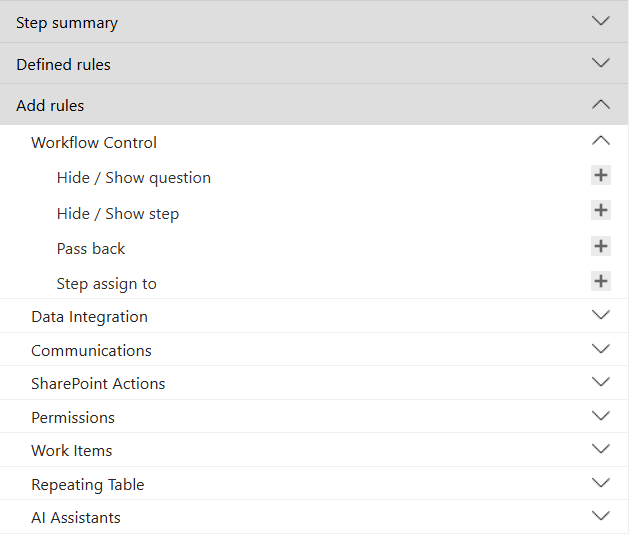
You can **Add rules** to a flow, step, or question. The possible rules are context specific, so for a flow or step you'll see six categories: workflow control, data integration, communications, SharePoint actions, permissions, and repeating table. For a question, you'll see five categories: workflow control, data integration, SharePoint actions, permissions, and repeating table.
Shown below, when adding a rule to a step, click **+** beside the relevant rule type to start adding a new rule. Once complete, this rule will appear in the **defined rules** list.
## Add rules
You can **Add rules** to a flow, step, or question. The possible rules are context specific, so for a flow or step you'll see six categories: workflow control, data integration, communications, SharePoint actions, permissions, and repeating table. For a question, you'll see five categories: workflow control, data integration, SharePoint actions, permissions, and repeating table.
Shown below, when adding a rule to a step, click **+** beside the relevant rule type to start adding a new rule. Once complete, this rule will appear in the **defined rules** list.
 ## Save or close
Once you've finished creating or updating your flow, you need to click **save**. Changes made to a step, question, or rule are not automatically applied to the flow, so it's important to remember to save the flow after making updates. If you click **close**, no changes will be saved, but you will be prompted to confirm to avoid accidentally closing the flow.
## Save or close
Once you've finished creating or updating your flow, you need to click **save**. Changes made to a step, question, or rule are not automatically applied to the flow, so it's important to remember to save the flow after making updates. If you click **close**, no changes will be saved, but you will be prompted to confirm to avoid accidentally closing the flow.