> ## Documentation Index
> Fetch the complete documentation index at: https://docs.flowforma.com/llms.txt
> Use this file to discover all available pages before exploring further.
# Create Site
> Use the Create site rule to create a new SharePoint subsite from a FlowForma flow, defining the name, URL, template, title, description, and owners.
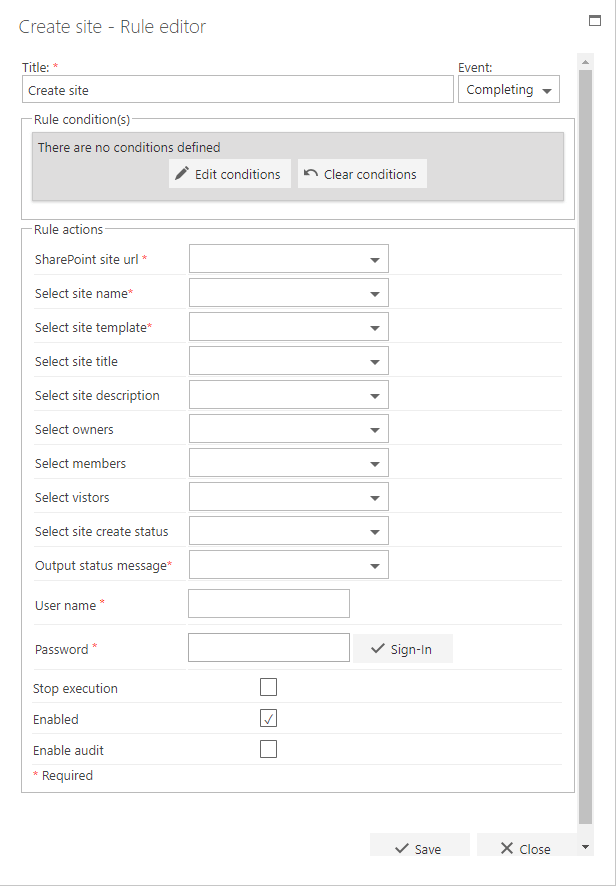
**Create site** allows you to create a new subsite in your site collection. You can define the **name**, **URL**, **template**, **title**, and **description** to use.
 ## Title
The first part of the business rule lets you define a **title** for your rule and select the event on which it operates. The default title is the standard **FlowForma** rule name; change it by deleting the text and entering your own.
In the **event** field you determine when the rule is executed. For a flow this can occur when the form is loaded, started, or completed. For a step this can occur when the step is started, saved, or completed. For questions it can occur when the question is updated.
## Rule condition(s)
The second part of the business rule lets you set conditions. These are not required, but if entered they control when the rule is executed in relation to other items in the form.
## Rule actions
* **SharePoint site URL**: select the question in the flow where the user enters the URL for the new site. This is the address of the parent site where you want the new site created.
* **Select site name**: select the question where the user enters the name of the new site (this is the URL/address of your site).
* **Select site template**: select the site template from the choice question in the flow (available templates include Team Site, Blank Site, Document Workspace, Basic Meeting Workspace, Blog, Wiki Site, Developer Site, Microsoft Project Site, Publishing Site, FlowForma, and FlowForma Trial). Note: you need a choice question in the flow with those options.
* **Select site title**: select the question where the user can enter the title for the new site.
* **Select site description**: select the question where the user can enter a description for the site (this is a tooltip visible when hovering the mouse over the site name).
* **Select owners**, **Select members**, **Select visitors**: select the person or group question from within the form for each group. You can only select one person or group per field. Note: the person creating the form will always have full control.
* **Select site create status (optional)**: this optional field returns true or false depending on whether the site creation was successful.
* **Output status message**: if the site is not created, this field is populated with an error message. For example, you can't create a site if another site with the same title already exists.
* **User name**: provide the username used to access the site.
* **Password**: enter the password that corresponds to the username you have entered.
- **Stop execution**: if stop execution is enabled and this rule is executed, no other rules are executed.
- **Enabled**: rules aren't saved to a list like questions and steps are, so if you want to stop a rule executing without deleting it, toggle this option to enable or disable the rule.
- **Enable audit**: if checked, a record is added to the audit trail when this rule is executed. This option is available when the Compliance feature pack is activated.
If a site with the same name already exists, the rule will not execute. This means that if you place the rule on step completed, the step will still submit even though the site was not created. You can prompt the user with a notification that the site wasn't created (in the rule's settings) or send an email letting the requester know the site wasn't created.
## Title
The first part of the business rule lets you define a **title** for your rule and select the event on which it operates. The default title is the standard **FlowForma** rule name; change it by deleting the text and entering your own.
In the **event** field you determine when the rule is executed. For a flow this can occur when the form is loaded, started, or completed. For a step this can occur when the step is started, saved, or completed. For questions it can occur when the question is updated.
## Rule condition(s)
The second part of the business rule lets you set conditions. These are not required, but if entered they control when the rule is executed in relation to other items in the form.
## Rule actions
* **SharePoint site URL**: select the question in the flow where the user enters the URL for the new site. This is the address of the parent site where you want the new site created.
* **Select site name**: select the question where the user enters the name of the new site (this is the URL/address of your site).
* **Select site template**: select the site template from the choice question in the flow (available templates include Team Site, Blank Site, Document Workspace, Basic Meeting Workspace, Blog, Wiki Site, Developer Site, Microsoft Project Site, Publishing Site, FlowForma, and FlowForma Trial). Note: you need a choice question in the flow with those options.
* **Select site title**: select the question where the user can enter the title for the new site.
* **Select site description**: select the question where the user can enter a description for the site (this is a tooltip visible when hovering the mouse over the site name).
* **Select owners**, **Select members**, **Select visitors**: select the person or group question from within the form for each group. You can only select one person or group per field. Note: the person creating the form will always have full control.
* **Select site create status (optional)**: this optional field returns true or false depending on whether the site creation was successful.
* **Output status message**: if the site is not created, this field is populated with an error message. For example, you can't create a site if another site with the same title already exists.
* **User name**: provide the username used to access the site.
* **Password**: enter the password that corresponds to the username you have entered.
- **Stop execution**: if stop execution is enabled and this rule is executed, no other rules are executed.
- **Enabled**: rules aren't saved to a list like questions and steps are, so if you want to stop a rule executing without deleting it, toggle this option to enable or disable the rule.
- **Enable audit**: if checked, a record is added to the audit trail when this rule is executed. This option is available when the Compliance feature pack is activated.
If a site with the same name already exists, the rule will not execute. This means that if you place the rule on step completed, the step will still submit even though the site was not created. You can prompt the user with a notification that the site wasn't created (in the rule's settings) or send an email letting the requester know the site wasn't created.