> ## Documentation Index
> Fetch the complete documentation index at: https://docs.flowforma.com/llms.txt
> Use this file to discover all available pages before exploring further.
# CSV mapping
> The CSV Mapping rule imports data from an uploaded CSV file into a repeating table, mapping each column to a sub-question with overwrite or append options.
The CSV Mapping rule maps a CSV file to a repeating table. You need to upload the CSV file into a File Upload question first.
 ## Title
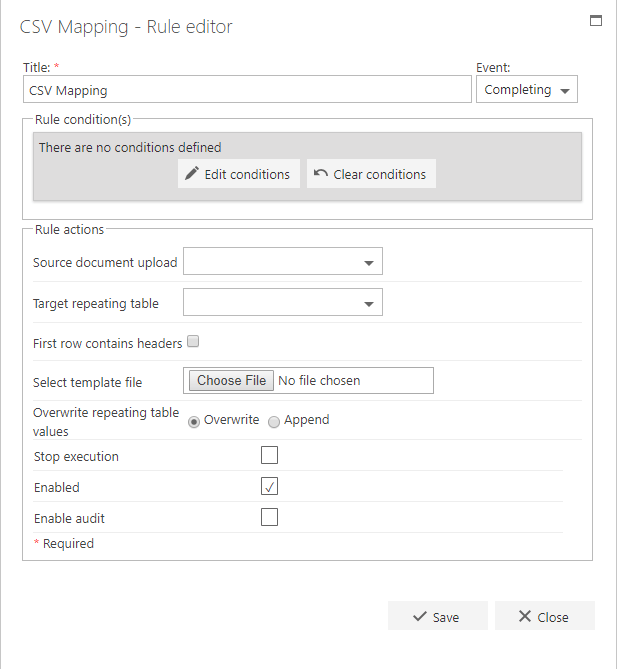
The first part of the business rule lets you define a **title** for your rule and select the event on which it operates. The default title is the standard **FlowForma** rule name; change it by deleting the text and entering your own.
In the **event** field you determine when the rule is executed. For a flow this can occur when the form is loaded, started, or completed. For a step this can occur when the step is started, saved, or completed. For questions it can occur when the question is updated.
## Rule condition(s)
The second part of the business rule lets you set conditions. These are not required, but if entered they control when the rule is executed in relation to other items in the form.
## Rule actions
* **Source document upload:** select the File Upload question where the user will upload the CSV file.
* **Target repeating table:** select the repeating table question you want to map the CSV file to.
* **First row contains headers:** if checked, the first row of the CSV file is ignored, as it contains the column header names rather than data.
* **Select template:** when you're selecting the mappings, the CSV file's columns appear as Column0, Column1, Column2, etc. You can upload a template with the heading names so you can see which columns you're mapping to sub-questions.
* **Overwrite repeating table values:** decide whether to overwrite the repeating table or append (add) the content to it.
- **Stop execution**: if stop execution is enabled and this rule is executed, no other rules are executed.
- **Enabled**: rules aren't saved to a list like questions and steps are, so if you want to stop a rule executing without deleting it, toggle this option to enable or disable the rule.
- **Enable audit**: if checked, a record is added to the audit trail when this rule is executed. This option is available when the Compliance feature pack is activated.
## Example
When you select the file upload question and target repeating table question, the options to map the repeating table questions to CSV values appear.
## Title
The first part of the business rule lets you define a **title** for your rule and select the event on which it operates. The default title is the standard **FlowForma** rule name; change it by deleting the text and entering your own.
In the **event** field you determine when the rule is executed. For a flow this can occur when the form is loaded, started, or completed. For a step this can occur when the step is started, saved, or completed. For questions it can occur when the question is updated.
## Rule condition(s)
The second part of the business rule lets you set conditions. These are not required, but if entered they control when the rule is executed in relation to other items in the form.
## Rule actions
* **Source document upload:** select the File Upload question where the user will upload the CSV file.
* **Target repeating table:** select the repeating table question you want to map the CSV file to.
* **First row contains headers:** if checked, the first row of the CSV file is ignored, as it contains the column header names rather than data.
* **Select template:** when you're selecting the mappings, the CSV file's columns appear as Column0, Column1, Column2, etc. You can upload a template with the heading names so you can see which columns you're mapping to sub-questions.
* **Overwrite repeating table values:** decide whether to overwrite the repeating table or append (add) the content to it.
- **Stop execution**: if stop execution is enabled and this rule is executed, no other rules are executed.
- **Enabled**: rules aren't saved to a list like questions and steps are, so if you want to stop a rule executing without deleting it, toggle this option to enable or disable the rule.
- **Enable audit**: if checked, a record is added to the audit trail when this rule is executed. This option is available when the Compliance feature pack is activated.
## Example
When you select the file upload question and target repeating table question, the options to map the repeating table questions to CSV values appear.
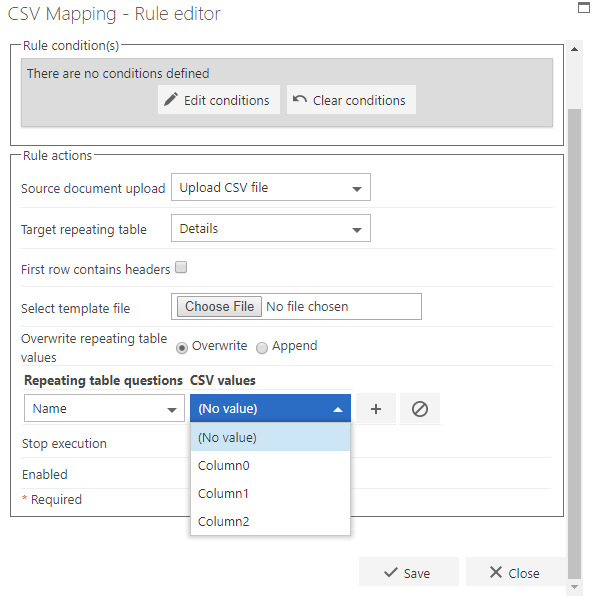 The CSV values show as Column0, Column1, Column2, etc. You can upload a template file containing the column headings you want to use, which makes it easier to map the questions.
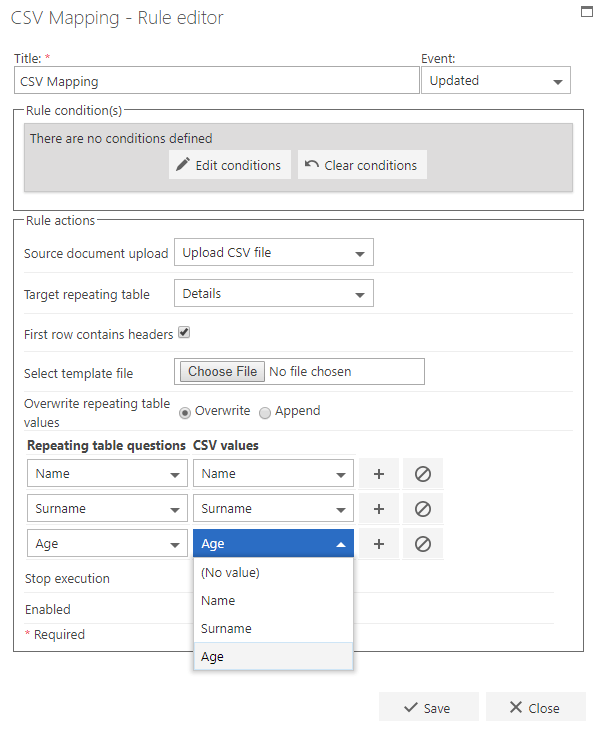 When you create a new form and upload a CSV file, the content is then mapped to a repeating table.
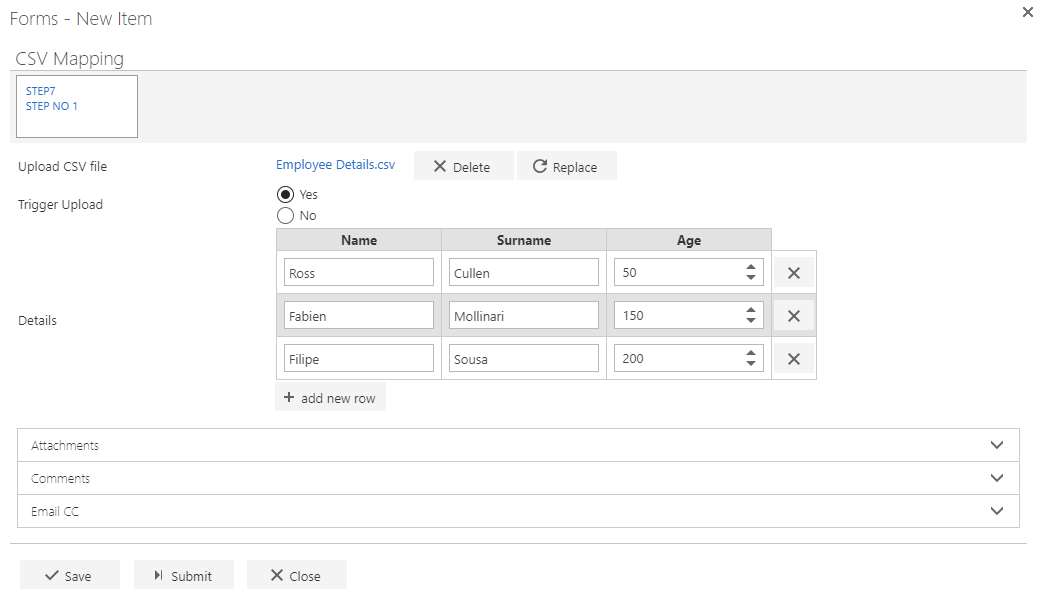 **Note:** In this example, the CSV Mapping rule is added to the "Trigger upload" question to execute when the question answer is updated, but it could be added to other events (e.g. on step completed) like any other rule.