> ## Documentation Index
> Fetch the complete documentation index at: https://docs.flowforma.com/llms.txt
> Use this file to discover all available pages before exploring further.
# Get, add and set dates
> Get, add, and set dates in a FlowForma form using set question value rules and JavaScript methods like getMonth, setDate, and the Add time function.
When using FlowForma, you may need to interact with dates, for example if you want to set a deadline for your process or have conditions based on the current month. This documentation will help you to know how to get, add and set dates.
## Get the current date, month or current year
In FlowForma you can get the current date, month or year using a set question value rule.
This data can be then stored into a date, a number or a single line of text question depending on what you want to achieve.
Here is an example on how to get the current month into a number type of question.
1. Add a number question. In this example we'll call it **current month**
2. Create a set question value rule. It can be on form loaded, step started or completed, or even on question change.
1. Select the current month question as the target question
2. You'll need to build an expression to get the current date and return the month number: ***new Date()*** creates a new date with the current date as a default value (21/06/2016 for example), and ***.getMonth()+1*** will return the month number from this date (which is 6 here). All together it gives this expression: ***new Date().getMonth()+1***
You can copy paste this directly in the expression builder.
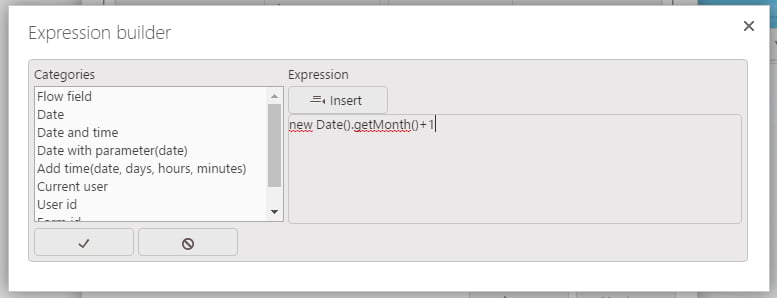 c. Click **√** to save the rule
3. Test the result
Note: getMonth() in javascript is returning by default the current month -1. Therefore, if you use this rule in January, getMonth() will return 0. Then 1 for February and so on until 11 for December.
To get the current date, you can insert the following expression in the expression builder:
***new Date().getDate()*** – this will return the actual date without any subtraction. If it is the 21st of May 2016 it will return 21.
To get the current year, you can insert the following expression in the expression builder:
***new Date().getFullYear()*** – this will return the actual year without any subtraction. If it is the 21st of May 2016 it will return 2016.
## Add days, months, or years to a date question
In FlowForma you can also add days, months, or years to a date. By default, there is a function called **Add time** inside the categories list of the expression builder to add days, hours, or minutes.
c. Click **√** to save the rule
3. Test the result
Note: getMonth() in javascript is returning by default the current month -1. Therefore, if you use this rule in January, getMonth() will return 0. Then 1 for February and so on until 11 for December.
To get the current date, you can insert the following expression in the expression builder:
***new Date().getDate()*** – this will return the actual date without any subtraction. If it is the 21st of May 2016 it will return 21.
To get the current year, you can insert the following expression in the expression builder:
***new Date().getFullYear()*** – this will return the actual year without any subtraction. If it is the 21st of May 2016 it will return 2016.
## Add days, months, or years to a date question
In FlowForma you can also add days, months, or years to a date. By default, there is a function called **Add time** inside the categories list of the expression builder to add days, hours, or minutes.
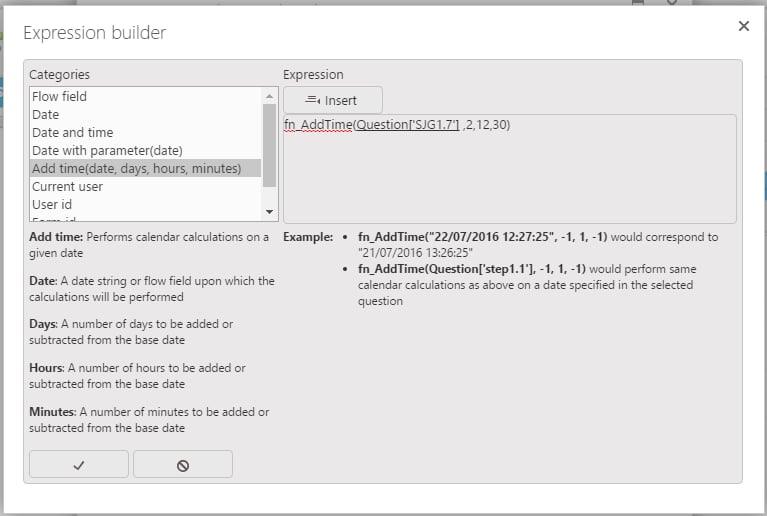 In the screenshot above, the target date will be set as the date entered in the Question\['SJG1.7'] + 2 days, +12 hours and +30 minutes.
If you want to add months or years, you need to use a custom javascript function with the set methods as explained below with several examples.
## Set a specific day, month, or current year to a date question
In FlowForma you can set a fixed day, month, or year to a date question using a set question value rule. For that, you can use the following javascript methods:
* setDate()
* setMonth()
* setYear()
Contrary to the getDate(), getMonth(), getFullYear(), those methods need to be contained inside a javascript function. Here is an example of a function that sets the date to the first day of the current month: ***(function()\{var date = new Date();date.setDate(1);return date;})();***
You can simply copy and paste the above function into the expression builder.
In the screenshot above, the target date will be set as the date entered in the Question\['SJG1.7'] + 2 days, +12 hours and +30 minutes.
If you want to add months or years, you need to use a custom javascript function with the set methods as explained below with several examples.
## Set a specific day, month, or current year to a date question
In FlowForma you can set a fixed day, month, or year to a date question using a set question value rule. For that, you can use the following javascript methods:
* setDate()
* setMonth()
* setYear()
Contrary to the getDate(), getMonth(), getFullYear(), those methods need to be contained inside a javascript function. Here is an example of a function that sets the date to the first day of the current month: ***(function()\{var date = new Date();date.setDate(1);return date;})();***
You can simply copy and paste the above function into the expression builder.
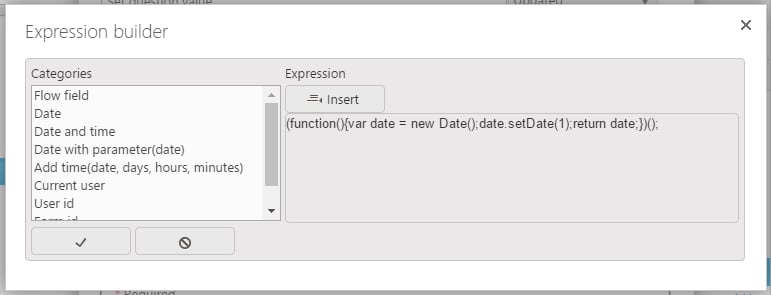 In this example, setDate(1) will set the date to the first day of the month. Therefore, if it is the 22nd of May 2016, the target date will be set as 01/05/2016.
You can have a combination of these methods in order to set the specific date that you need. For instance if you want to set the target date as the 1st of January of next year you can use the following function:
***(function()\{var date = new Date();date.setDate(1);date.setMonth(0);date.setYear(date.getFullYear()+1);return date;})();***
If you want to apply **calculation on a specific date** of your flow, you need to do the following:
* copy and paste in the expression builder the first part of your function ***(function()\{var date = new Date(***
* Select **Date with parameter(date)** from categories list and insert it into your expression
* Remove **date)** after fn\_Date(
* Select and insert **your question from the flow field** category
* Copy and paste the last part of your function ***));date.setMonth(date.getMonth()+3);return date;})();***
Here is what you need to see in the expression builder before saving:
In this example, the target date will be equalled to the date reported + 3 months
In this example, setDate(1) will set the date to the first day of the month. Therefore, if it is the 22nd of May 2016, the target date will be set as 01/05/2016.
You can have a combination of these methods in order to set the specific date that you need. For instance if you want to set the target date as the 1st of January of next year you can use the following function:
***(function()\{var date = new Date();date.setDate(1);date.setMonth(0);date.setYear(date.getFullYear()+1);return date;})();***
If you want to apply **calculation on a specific date** of your flow, you need to do the following:
* copy and paste in the expression builder the first part of your function ***(function()\{var date = new Date(***
* Select **Date with parameter(date)** from categories list and insert it into your expression
* Remove **date)** after fn\_Date(
* Select and insert **your question from the flow field** category
* Copy and paste the last part of your function ***));date.setMonth(date.getMonth()+3);return date;})();***
Here is what you need to see in the expression builder before saving:
In this example, the target date will be equalled to the date reported + 3 months