> ## Documentation Index
> Fetch the complete documentation index at: https://docs.flowforma.com/llms.txt
> Use this file to discover all available pages before exploring further.
# Adding FlowForma to trusted script sources
> Add cdn.flowforma.com as a trusted script source in the SharePoint Admin Center so FlowForma keeps working once SharePoint Online CSP enforcement begins.
## What is SharePoint CSP?
Content Security Policy (CSP) is a security control enforced by Microsoft in SharePoint Online.
It defines which external websites and services are trusted and allowed to load or interact with SharePoint pages.
* Microsoft uses CSP to prevent:
* Malicious scripts
* Data leakage
* Click-jacking and cross-site attacks
As part of Microsoft's ongoing security hardening, SharePoint now actively enforces CSP rules, meaning external applications must be explicitly trusted.
*Content Security Policy (CSP) is an important browser security mechanism that helps protect web applications from threats such as cross‑site scripting (XSS), clickjacking, and other forms of code injection. By defining which resources (scripts, styles, images, and more) a page is allowed to load, CSP significantly reduces the risk of unauthorized or malicious code execution.*
[Support for Content Security Policy (CSP) in SharePoint Online | Microsoft Learn](https://learn.microsoft.com/en-us/sharepoint/dev/spfx/content-securty-policy-trusted-script-sources)
## Why is this needed?
Our solution integrates with SharePoint to:
* Load application content
* Exchange data securely
* Provide embedded or connected functionality within SharePoint pages
Because our service is hosted outside of Microsoft 365, **SharePoint must be explicitly told that our URL is trusted**.
Without this, SharePoint will block the connection by design.
This is not specific to our product, it applies to **any third-party solution** that integrates with SharePoint.
## What happens if our URL is not added?
If our URL is not added to the SharePoint trusted locations:
* Parts of the application may fail to load
* Embedded content may appear blank or blocked
* Users may see browser console errors or security warnings
* Key functionality may not work as expected
In short: the solution will not function correctly due to Microsoft security restrictions.
## SharePoint Online CSP rollout timeline
*Now – February 29, 2026: CSP is active in report‑only mode. No content is blocked, but violations are logged.*
*March 1, 2026: CSP enforcement begins. Non‑compliant scripts and resources will be blocked.*
*Optional: Enforcement can be delayed by 90 days (until June 1, 2026) using PowerShell.*
## Ensuring FlowForma compatibility
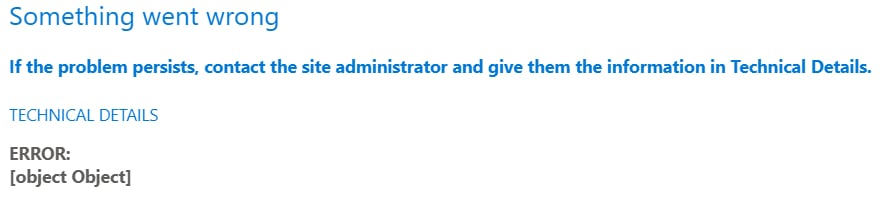
If the required settings are not applied automatically, you must manually add [cdn.flowforma.com](http://cdn.flowforma.com/) to the list of trusted script sources.
 ## How to add a trusted script source
* Open the SharePoint Admin Center.
* https\://\-admin.sharepoint.com
* Expand **Advanced** and select **Script sources**.
## How to add a trusted script source
* Open the SharePoint Admin Center.
* https\://\-admin.sharepoint.com
* Expand **Advanced** and select **Script sources**.
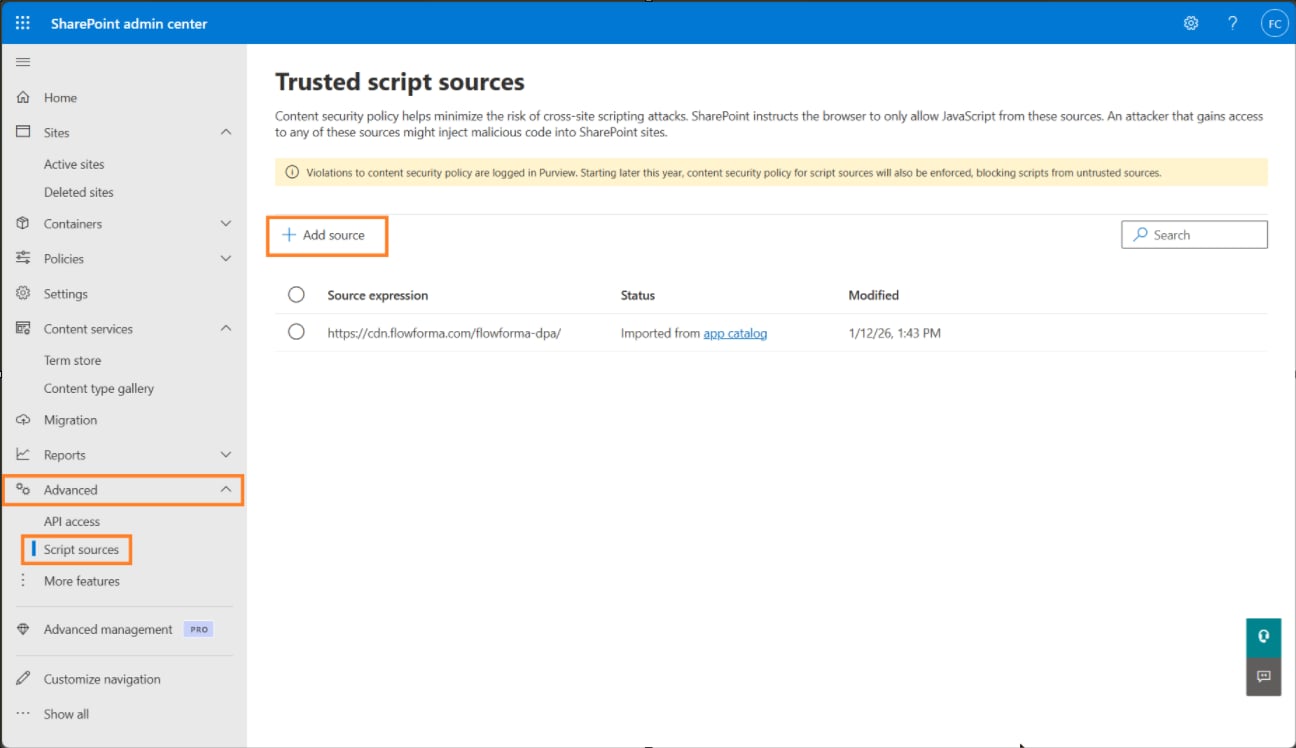 * Click **Add source**
* Add [cdn.flowforma.com](http://cdn.flowforma.com/) to the list.
* Click **Add source**
* Add [cdn.flowforma.com](http://cdn.flowforma.com/) to the list.
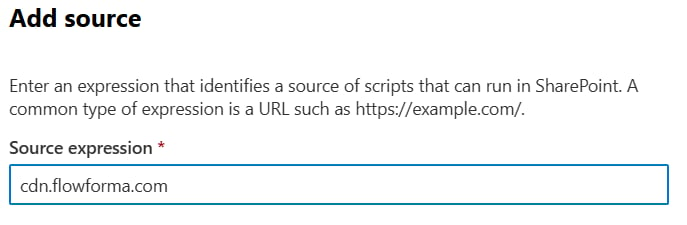 * Save the entry
All SPFx components should function as expected.
When installing the FlowForma 8 app from the SharePoint Store, [https://cdn.flowforma.com/flowforma-dpa/](https://cdn.flowforma.com/flowforma-dpa/) is automatically added to the trusted source
However this only covers the Core FlowForma application, additional features such as Governance and CWM are not covered, by adding [cdn.flowforma.com](http://cdn.flowforma.com/), it covers all FlowForma functionality.
* Save the entry
All SPFx components should function as expected.
When installing the FlowForma 8 app from the SharePoint Store, [https://cdn.flowforma.com/flowforma-dpa/](https://cdn.flowforma.com/flowforma-dpa/) is automatically added to the trusted source
However this only covers the Core FlowForma application, additional features such as Governance and CWM are not covered, by adding [cdn.flowforma.com](http://cdn.flowforma.com/), it covers all FlowForma functionality.